Connecting your ZN151 (Distribution Box) in order to operate the Abrites ECU PROGRAMMING software
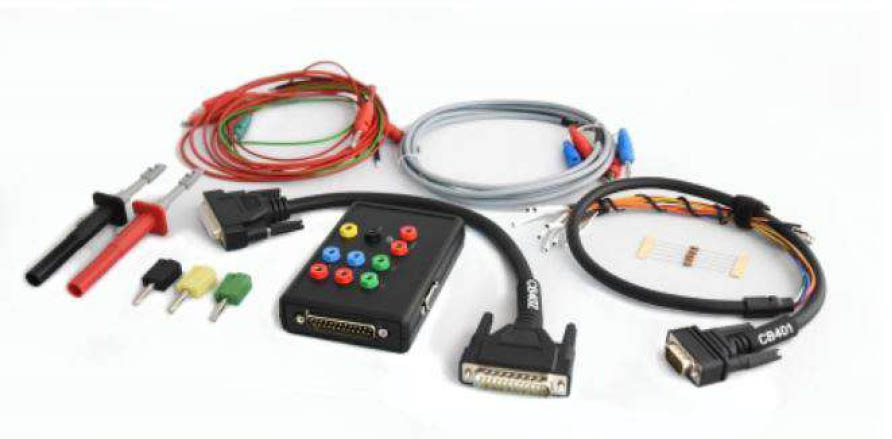
In order for your ECU PROGRAMMING software to be fully operational it requires a ZN151 (Distribution Box). The following are the pest practice steps we recommend everyone who wants to use the Abrites ECU PROGRAMMING tool to its full potential.
-
Please connect the distribution box to your AVDI and connect the AVDI to your personal computer where you have your AVDI software installed.
-
Please make sure you always have the latest possible version of the software. If in doubt about what the latest version is please check the news section on the abrites.com website where the news are always up to date. The same location will give you additional instructions should there be any specific additional change to the operation of the ECU PROGRAMMING software.
-
Once your AVDI and distribution box are connected you need to make sure what type of reading you are planning to do. Always start with connecting GND when establishing connection to the unit.The normal procedure would go in the following steps:
-
Try to read the ECU you plan on working on via the OBD. If this fails (not common):
-
Try the so called bench mode of reading, connecting to the ECU’s pins only from the outside without opening the ECU and soldering a BOOT pin. This method is described in details in section 4.
-
Should this method also fail then you can move to boot mode reading where you will be required to open the ECU and solder a boot pin to the designated internal position as per the diagrams in this manual.
- Bench mode method of reading an ECU. Commonly known as “BENCH” method or table connection depending on your region.
This method is extremely popular in today’s diagnostic ecosystem. Most of our colleagues who work on engine control unit replacement and automotive tuning, as well as those who work with key programming often use this method. It is common and relatively easy to apply to ECUs on almost every contemporary ECU especially the very common EDC17 Tricore type built by Bosch. When you start using the ECU PRO - GRAMMING tool together with the distribution box to read an ECU via BSL mode you need to make sure that you have the DB15 splitter cable supplied with your ZN151 set connected to your distribution box.
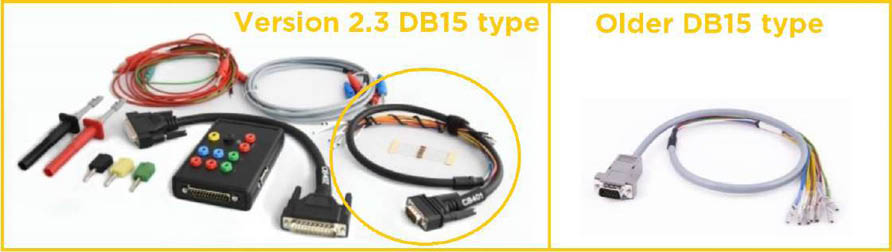
N.B! Please note that there are two distinct types of DB15 cables (the type of ZN151 v. 2.0, 2.1 and 2.2 is different when compared to v.2.3). Please note that this instructions manual is written specifically for the type of DB15 which comes with the v.2.3 distribution box. If your distribution box has been upgraded via the Abrites return upgrade program you probably have the older type of DB15 cables. This means that the colours in the manual do not match the cable you have. If this is the case please make sure to follow the labeling on the DB15 cable when connecting to an ECU. You can easily tell the two types apart as the picture below shows:
When reading an ECU in “Bench connection” mode please note that you can supply the distribution box with 12V from a desk type power supply or any reliable source of 12V. For this purpose your ZN151 distribution box is equipped with a set of cables which can be connected using the standard connectors on both ends. One end goes to the power source and the other - straight into the distribution box positive and negative sockets. Thus your ECU will be supplied with 12V so as to enable the ECU PROGRAMMING software to communicate with it.
N.B.! Please make sure to follow these steps when working on “BENCH”
-
AVDI connected to PC
-
ZN151 connected to AVDI
N.B! Please be informed the DB15 cable that is part of the Distribution Box set needs to be disconnected from the power supply during the wiring process of the unit.
Please use the pinouts supplied in this manual to connect the DB15 to the ECU, then connect the DB15 to the distribution box and then supply the distribution box with the external 12V from your power source. VERY IMPORTANT: The 5V supplied to the ECU by the AVDI WILL NOT be enough for the ECU to operate.
- BSL (bootstrap loader - https://en.wikipedia.org/wiki/Bootstrapping
If the above methods fail you will need to open the ECU and solder a “boot pin” to the ECU’s designated location as per the diagrams. ZN151 distribution box and the DB15 supplied in the set include a boot pin as well as a full set of resistors which will also be required. Every diagram shows the resistor requirements as well as the exact location. Please be EXTREMELY CAUTIOUS when using this method and make sure all your wiring is 100% before attempting boot reading.