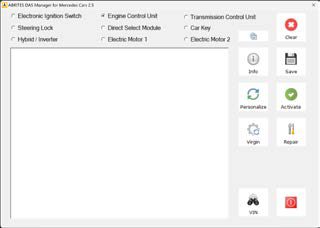
FBS4 Manager is the software that lets you work with DAS modules from the FBS4 platforms. The software is constantly growing and its functionalities will be expanding with future updates. The main screen of the software gives you the unit selection and shows the buttons with the available special functions.
You can work with the following modules
-
Electronic Ignition Switch (EZS/EIS)
-
Engine Control Unit (ECU)
-
Transmission Control Unit (TCU)
-
Electronic Steering Lock (ESL)
-
Direct Select Module (DSM/DSM222)
-
Car Key
-
48V started generators from family INV20EM01 (hybrid vehicles)
-
Electric motor 1 & 2
Functionalities
-
Info button will provide information about the type of unit and its status
-
Save button will start reading the FBS data and will let you save it to a file
-
Personalize button lets you write the FBS data, which you have already saved
-
Virgin button will set the unit to virgin state. This means the unit will be ready for personalization
-
VIN button will let you write the VIN to the module
-
Repair button will start a procedure for Electronic Steering Lock repair