The “ABRITES Diagnostics for Porsche” consists basically of three parts:
-
Standard diagnostic functions like reading/clearing trouble codes, device identification, coding, actual values, etc.
-
Key-learning
-
Special functions like reading login (PIN), reading EEPROM, etc.
All devices, which can be installed into the selected vehicle model are listed in the main screen of the “ABRITES Diagnostics for Porsche”. If you want to connect to some device please double click on it. The “ABRITES Diagnostics for Porsche” will try to connect to the device using some of the following protocols:
-
KWP2000 over TP2.0 with baud 5000KB/s (CAN)
-
KWP2000 over TP1.6 with baud 5000KB/s (CAN)
-
ISO protocol (CAN)
-
KWP2000 over K-Line with fast init
-
KWP2000 over K-Line with slow init.
You can choose which of these protocols to try when attempting to connect as described in the “Configuration” section.
3.1 Configuration
The “ABRITES Diagnostics for Porsche” can be configured by pressing the “Options” button from the main screen. The following dialog is displayed:
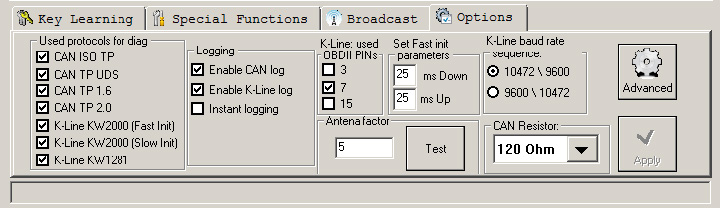
NOTE: changes regarding interface detection and timing parameters which you made in this dialog will be applied after restarting the application.
3.1.1 Used protocols
The meaning of the check-boxes is as follows:
-
CAN ISO TP - when trying to connect to the device the Diagnostics will try to connect to it using “ISO protocol (CAN)”.
-
CAN UDS TP - when trying to connect to the device the Diagnostics will try to connect to it using “UDS protocol (CAN)”.
-
CAN TP2.0 – when trying to connect to the device the Diagnostics will try to connect to it using “KWP2000 over TP2.0 with baud 500KB/s”.
-
CAN TP1.6 – when trying to connect to the device the Diagnostics will try to connect to it using “KWP2000 over TP1.6 with baud 500KB/s”.
-
K-Line KWP2000 (Fast Init) – when trying to connect to the device the Diagnostics will try to connect to it using over K-Line with fast init.
-
K-Line KWP2000 (Slow Init) – when trying to connect to the device the Diagnostics will try to connect to it using over K-Line with slow init.
-
K-Line KW1281 – when trying to connect to the device the Diagnostics will try to connect to it using over K-Line with slow init.
NOTE: These check-boxes are used for configuring only the used protocols when trying to connect to the device in order to perform standard diagnostic requests, they are not applied when auto-scanning devices.
3.1.2 Interface detection
Normally the “ABRITES Diagnostics for Porsche” USB Interface is recognized automatically.
3.1.3 K-Line baud rate settings
When trying to connect to the device over K-Line the Diagnostics will try to connect to it using one baud rate and if it doesn’t succeed it will switch to another baud rate and try again. There are two baud rate values currently used – 10427 and 9600. Using the “10472 \ 9600” and “9600 \ 10247” radio-buttons within the options dialog one can set the order in which these two baud rate values will be used. If “10472 \ 9600” is selected, then first the Diagnostics will try to connect to the device over K-Line using baud rate 10472 and if it doesn’t succeed, it will switch to 9600 and try again with it. If “9600 \ 10472” is selected, then first the Diagnostics will try to connect to the device using baud rate 9600 and if it doesn’t succeed it will switch to 10472 and try again with it.
ATTENTION: Some device working on baud 9600 cannot be waked up if they are first tried on baud 10472, so if you cannot connect to device through the K-Line, try to change the options so first to try on 9600.
3.1.4 Timing parameters
The protocols running under K-Line require very precise byte timing. Since Windows is not a real-time operating system, these times are not always respected, so it is possible that the communication with some devices is unstable, or it is not possible to connect. In such cases you can try to change some of the times timing parameters from the “Advanced” button.
The timing parameters have the following meaning:
-
Wakeup echo delay – time after slow init between receiving “55 xx yy” and sending the inverted value of “yy” (according the K-Line wakeup procedure)
-
Communication echo delay – time between reception of a byte under KWP1281 and sending it inverted back to the device
-
Inter byte time – time between sending two bytes under KWP2000
-
Time between messages – time delay between reception of response from device and sending new request to it.
3.1.5 K-Line PINs
Normally the K-Line is output on PIN7 of the OBDII connector. But some models (e.g. Porsche Cayenne 2004) the K-Line with some units might be on PIN3 or PIN15. For that reason there is a option on which PINs to try to connect to the units.
ATTENTION: If you check all PINs to be examined (i.e. PIN3, PIN7, PIN15) then when scanning for units the time will will be significantly increased. For that reason by default only PIN7 is selected.
3.1.6 CAN resistance
According the CAN specification there should be a resistance between CAN-Low and CANHigh. Normally the gateway has this resistance, but if you want to connect on some device on the table then you should use that resistance. For that reason there is a option what resistance to use – None, 75 Ohme, 100 Ohm, 120 Ohm, or 10 Kiloohme. By default 120 Ohm is used. Normally you should don’t have any problems, but if some problem appear you can try to change the CAN resistance.