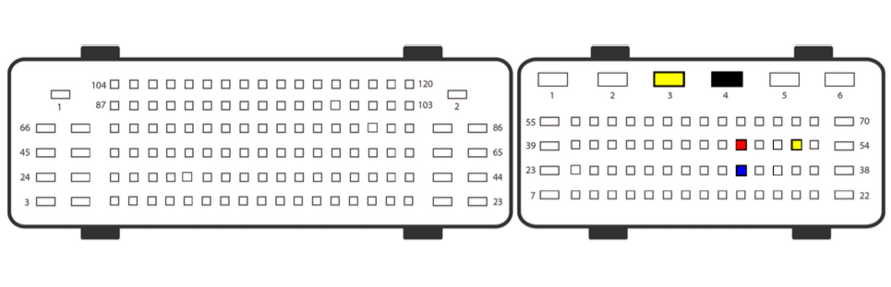
In order to read the PIN from ECU on bench you can use the “CB013” cable and the following pinout Power supply needs to be provided and you can use the power adapter from the ZN074 set for that job.
Once the ECU is wired and powered up, you need to follow these steps
- Open the software and select the vehicle
- After the scan is complete, select the ECU module
- Open the module via the diagnostic menu and select the ECU type from the menu
- Select “Read PIN“ menu on the left hand side and follow the on-screen instructions
- You will be asked to select the “AKL“ option if no working keys are present, make sure you do that
- The procedure may take up to 1 hour to obtain the PIN
- Once you have the PIN, please make sure you save it for later use.
Connection diagram for Continental VD56.1