Connection diagram for each supported unit can be found in the software. In order to access a diagram you should follow the steps below.
Step-by-step procedure
1. Open the software
2. Select the type of MCU
RH850 or V850.
3. Select the unit you are working with
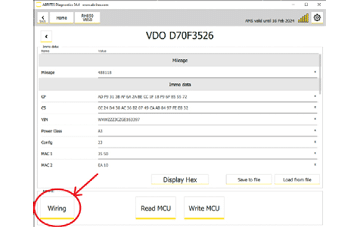
4. Click on the "Wiring" button
This will open a new window where you will be able to see all required details: wiring diagram, front and back side of the unit itself, and both sides of the PCB.
Important notes
- The software is the authority, not this page. Diagrams are kept with the build you are running, and the supported-unit list changes constantly.
- Verify the wiring with a multimeter before powering anything - see Connection and diagrams.