After starting the application in the main screen of the “Abrites Diagnostics for VAG” you will see a list of all possible units with their appropriate VAS number.
Once you have that you are able to connect to the listed devices by double clicking on them.
There is a possibility to scan for all installed modules in the vehicle. There are two modes of scanning – smart scan and standard scan.
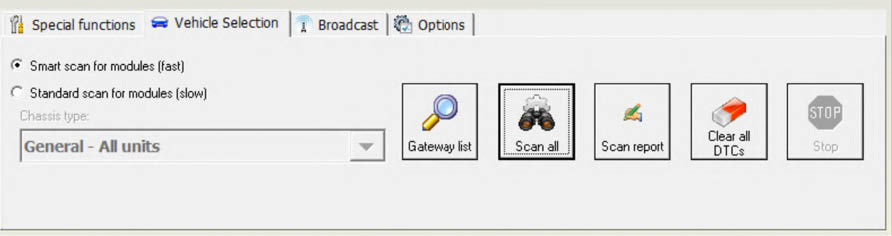
- Standard scan – the software is iterating through all possible units and is trying to establish connection to them. This was the only one scanning mode prior software version V24.
You can also choose a configuration of devices corresponding to the specific car (chassis type) instead of displaying all possible units. This is done by selecting the type (e.g. “1T – VW Touran) from the “Chassis type” combo box. If you then select the “Display button” it will show all devices that can be installed into the chassis type in question.
Pressing the “Scan all” button will attempt to connect to each device currently displayed in the list. Depending on the configuration options only the selected protocols will be used when scanning for the devices.
Instead of scanning all units (which can take a while) you can retrieve the list of the installed devices from the gateway by selecting the “Gateway config list” button, and then to press the “Scan all” button.
- Smart scan – this scan mode is introduced into V24 and is the default scan mode. It is scanning extremely fast for CAN-Bus vehicles, but also for the K-Line there is improvement. The found modules at the end of the scan should be the same as with the standard scan.
For all devices found by the “Abrites Diagnostics for VAG” a detailed information is displayed in the main screen. The following information is displayed for each device:
-
VAS number.
-
Unit Name.
-
VAG number – returned by the device in the device identification.
-
Description – returned by the device in the device identification.
-
Coding – returned by the device in the device identification.
-
Part / IMP / Supp N (Part number/ Importer number/ Supplier number) – the information is shown separated with spaces, also returned from the device with in the device identification.
-
DTC – number of Diagnostic Trouble Codes stored in the unit.
Since clearing of the DTCs for all existing devices is one of the main diagnostic operations and broadcast requests for clearing of all DTCs are not accepted from all units there is a possibility to scan all devices and then if a connection to the device is possible to clear its DTCs. This is done by clicking on the “Clear all DTCs” button on the “Auto scan devices” panel. Once again, the standard or smart mode is applied.