Reading the EZS hashes through the key fob with the ZN076 IR adapter
Please use the ZN076 adapter to connect to the EZS.
Required equipment
- Abrites AVDI interface
- ZN130 ABPROG programmer
- ZN076 adapter, including the IR adapter
- The vehicle's key fob
Step-by-step procedure
1. Connect the ZN076 to the EZS
Use the ZN076 adapter to connect to the EZS.
2. Select the model
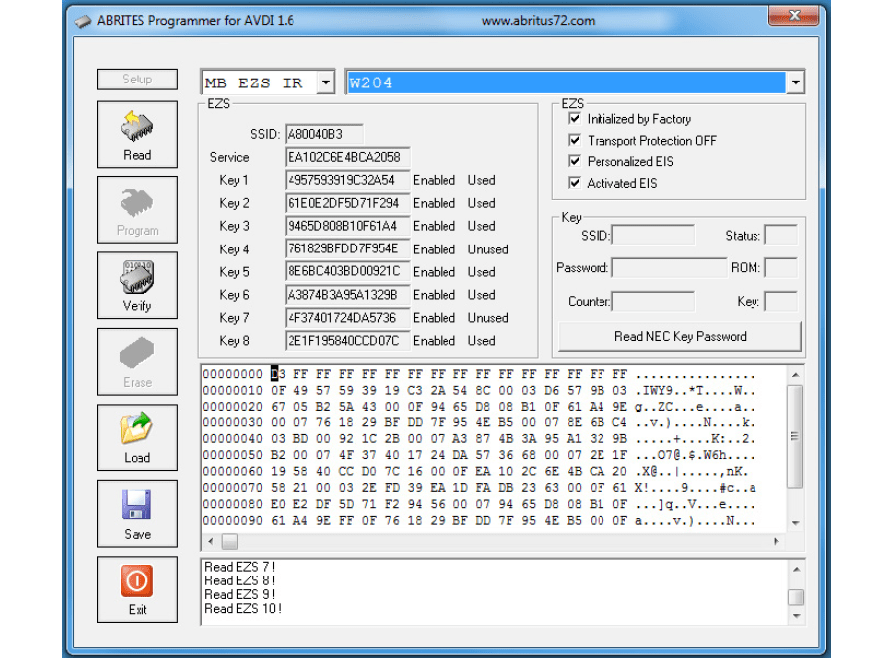
From the drop down please select MB_EZS_IR and the model i.e. W204.
3. Read
Press the read button and place the IR adapter in the key fob.
4. Collect the hashes
After reading the key fob the hashes will be displayed.
Important notes
- For some models you will need to take the key in and out of the fob multiple times. This is expected behaviour, not a fault.
- The hashes alone are not enough to generate a dump - you also need the password from the NEC MCU, read on the next page.
Troubleshooting
| Issue | Likely cause | Solution |
|---|---|---|
| No hashes appear | The IR adapter is not seated in the fob, or the model is wrong | Re-seat the IR adapter, confirm MB_EZS_IR and the correct model in the drop-down |
| Reading stops part-way on some models | The key needs re-inserting | Take the key in and out of the fob multiple times and repeat |