Place the NEC processor from the key on the adapter plate (part of the ZN076).
Required equipment
- Abrites AVDI interface
- ZN130 ABPROG programmer
- ZN076 adapter, including the adapter plate
- The NEC processor from the key
Step-by-step procedure
1. Place the NEC on the adapter plate
Place the NEC processor from the key on the adapter plate, which is part of the ZN076.
2. Read the password
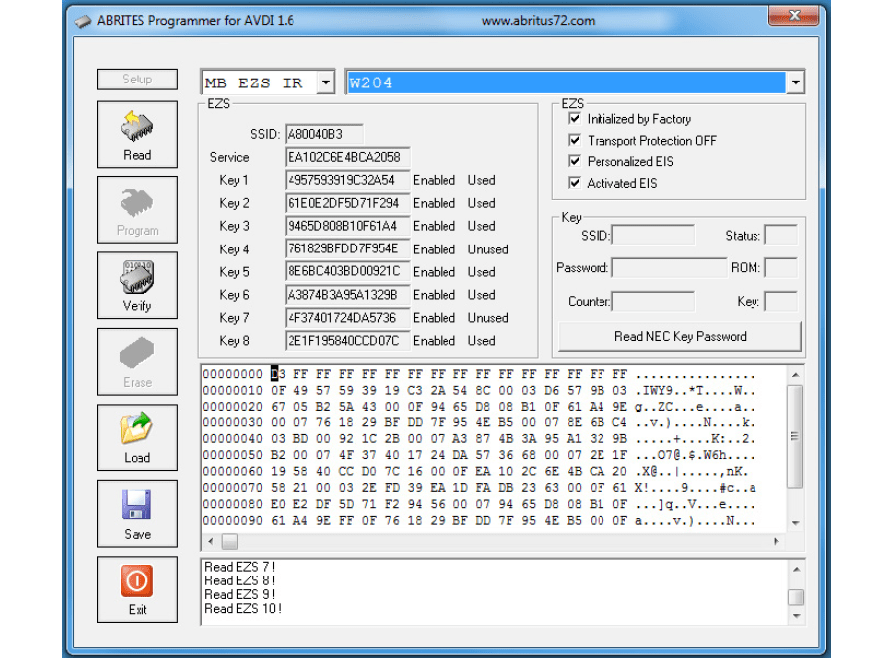
Press the “READ NEC KEY PASSWORD” and wait until the reading is over. This process can take from several seconds up to a few minutes.
3. Collect the result
After successfully reading the password you will see the SSID and password fields among other details.
4. Save the file
When you have the full dump, the hash files + the password you can save the file and use it later in order to generate the dumps using the Abrites diagnostics for Mercedes.
Important notes
- A few minutes is normal. The read is not stuck; let it finish.
- This is the half that supplies the password; the hashes come from the EZS over IR.
- Version 57 is the target here. The ZN033 adapter supports V57 and some V51 for the erase/virginise work.
Troubleshooting
| Issue | Likely cause | Solution |
|---|---|---|
| Reading never completes | Poor contact on the adapter plate | Re-seat the NEC processor and keep it still for the whole read |
| No SSID or password fields shown | The read did not succeed | Repeat the read; confirm the MCU is a version 57 |