The ZF 8HP EGS in the E-series is synchronized with the DME/DDE only.
It is not an automatic procedure and the DME of the donor car is required (or a dump from it).
The procedure is the following:
1. Take the DME/DDE of the donor car , connect to it in Boot mode, open the Boot mode function of the BMW/Mini Online software and read it(described in chapter 3.2.5.2)
2. Once the DME/DDE is read click on “Advanced info” and copy the EGS ISN.
3. Read the original DME/DDE in boot mode, click on “Advanced Info” and set/paste the EGS ISN you’ve copied from the DME/DDE of the donor car.
If you have a dump from the DME/DDE of the donor car you could skip step 1, open the Boot mode function, Load the dump and click on “Advanced info”.
Another way to adapt it would be to get both DME/DDE and EGS from the donor car and adapt the DME/ DDE only (as the EGS is synchronized with the DME/DDE only).
F-Series EGS (TCU) adaptation
- 6HP EGS Adaptation procedure - the adaptation of a 6HP EGS in the F-Series is currently not supported.
- 8HP EGS Reset and Adaptation procedure
The ZF 8HP gearbox EGS in the F-Series can be reset to a virgin state and can be easily adapted. Procedure is executed in the vehicle by OBDII.
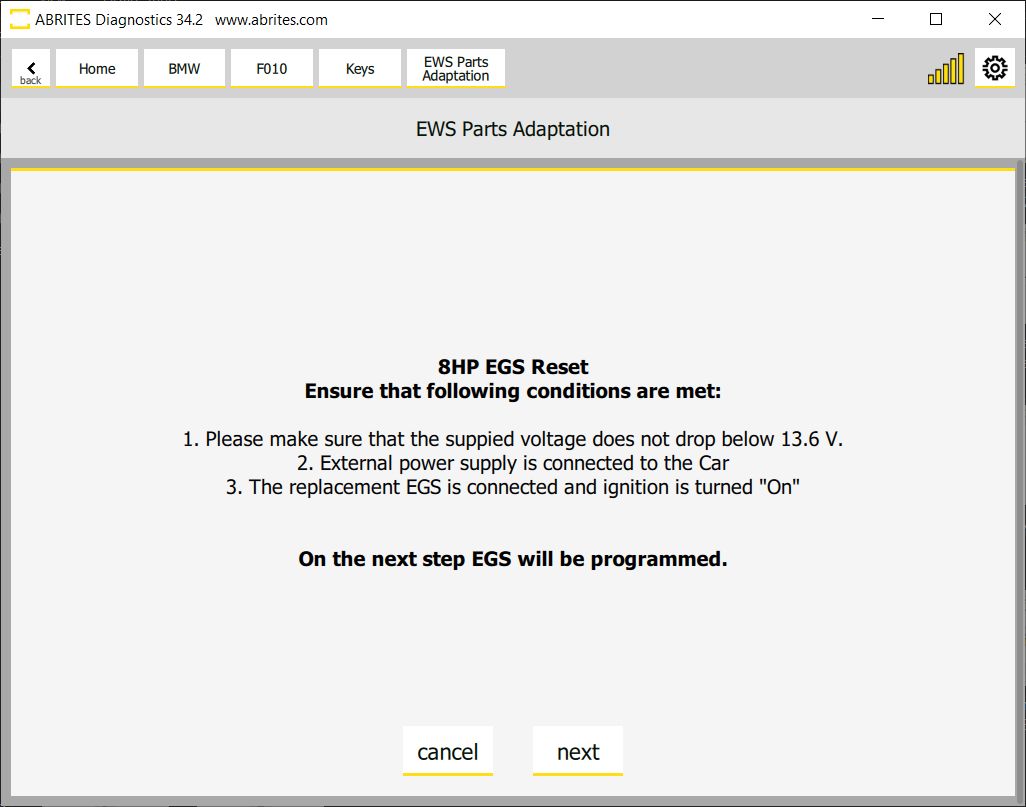
Go to Keys and Start Synchronization, open the EWS Parts Adaptation Menu > 8HP EGS EWS Reset
Make sure that external power supply is connected to the car and the supplied voltage does not drop below 13.6V. The replacement EGS needs to be installed in the car and the IGN turned on.
Please make sure you follow all the steps and on-screen messages strictly, the procedure is guided, at the end the software will ask you to turn IGN ON and wait for 2 min, than turn IGN OFF and wait for 2 min, and repeat this process 5 times - make sure you keep an eye on the messages and execute what is asked.
Important notes
-
The ignition cycling takes about 20 minutes in total. Do not cut it short.
-
If the reset and adaptation cannot be done over OBDII at all, it can be done on bench — see 11.3 ZF 8HP EGS Reset by dump.