This option is intended for saving a backup of all immobilizer data of FEM/BDC/ units.
In order to read the immobilizer data you need to “prepare/unlock” the unit first, which means you have to start the EWS Manager procedure.
This option is useful when adapting used FEM/BDC /units - the backup file read from the original unit contains all immobilizer data (incl. VIN, information about the keys, frequency type, etc) which can be transferred to the new unit (from donor vehicle). Once the data is transferred, it won’t be necessary to adapt the unit or to program new keys. Using this method of adaptation, you will be able to order a key for this vehicle from the dealer, as the donor unit works as the original.
Here are steps:
1. “Prepare/unlock” the original FEM/BDC/ (from host vehicle) unit by starting the procedure (Keys and Start synchronization > EWS Manager)
2. Once the unit is “prepared/unlocked” you have to select the “Save EWS Data” option from the EWS Functions menu. (Continue on next page)
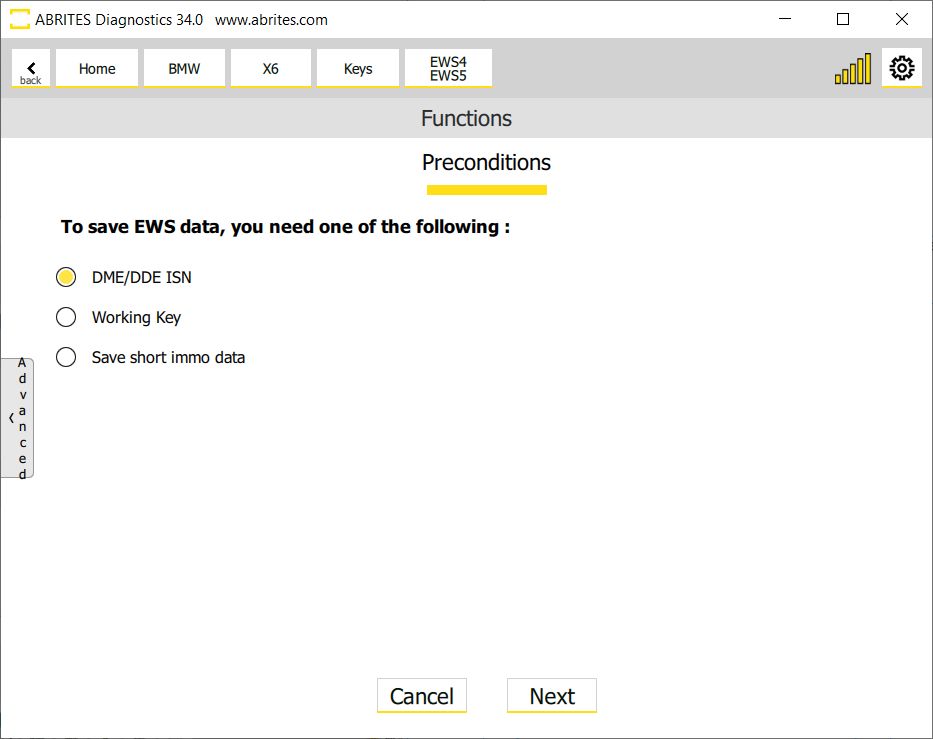
3. You have a few options to save the immo data from this module:
-
DME/DDE ISN - if you have the ISN you can manually write it and continue with saving the data to a file, which can later be used to restore the module.
-
Working Key - if you have a working key of the vehicle, you can now use it so that the procedure continues and you save the data to a file, which can later be used to restore the module.
-
Save short immo data - this option would save a file, which would not be useful for full module adaptation or restore.
*If you want to use this file for further module adaptation, it does not have the complete immo data of the car, and you would need the ISN.
4. Save the Immobilizer data backup.
5. “Prepare/unlock” the new FEM/BDC/CAS4 (from donor vehicle) unit by starting the EWS Manager (Keys and Start synchronization > EWS Manager)
6. Once the unit is “prepared/unlocked” you have to select the “Restore EWS Data” option from the EWS Functions menu.
Important notes
-
Restore EWS Data virginizes the unit first, then writes the backup — you do not need to virginize it yourself beforehand.
-
This is the route to prefer whenever the original unit can still be read. The alternative, adapting a virgin donor from scratch, leaves you having to program keys as well — see 10 FEM/BDC Adaptation.