The Abrites Vehicle Diagnostics Interface (AVDI) is one of the most advanced diagnostic interfaces currently in existence. Apart from the features of the interface when it is used together with the Abrites Diagnostic Software developed by Abrites ltd. It can also be used as an interface between the vehicles and the vehicle manufacturer’s diagnostic equipment as well other 3rd party software applications. This feature is available using AVDI and the J2534 Passthru driver.
In case you have access to passthru it will be sent to you together with reset of the software suite. J2534 is an interface standard designed by SAE (Society of Automotive Engineers) and mandated by the US EPA (Environmental Protection Agency) for vehicle ECU reprogramming. Its target is to create an API (Application Programming Interface) which would be adopted by all vehicle manufacturers, allowing the Independent Aftermarket (IAM) the ability to reprogram ECUs without the need for a special dealer-only tool. The EPS regulation mandates that automotive OEMs must comply with the SAE J2534 passthrough reprogramming from model year 2004 and forward for their Powertrain ECUs. Additionally, the specification includes a provision that allows OEMs to use the J2534 reprogramming method on 1996 through 2003 model year vehicles as long as the OEMs make all necessary additional hardware (i.e. cables) available to the aftermarket. If an OEM cannot retroactively implement the J2534 pass-through reprogramming solution with or without special cables, they must make any information needed to develop aftermarket equivalents of their OEM-specific reprogramming hardware and software available to equipment and tool companies. J2534 pass-through reprogramming is mandatory on all vehicles from model year 2004 and onward, but it is only required for emissions-based ECU’s (e.g. Powertrain, Engine, Transmission). Additional ECU support (Chassis and Body) will be dependent on each individual manufacturer’s implementation priorities and reprogramming application capabilities. Many of the manufacturers introduce J2534 not only as a reprogramming standard but also as a standard for common diagnostic activities.
1.1 Installation
In order to install the Abrites passthru driver you will need to download the passthru file for your AVDI ID number. This file is usually sent to you together with the rest of the software for your AVDI interface. Once the file is downloaded the installation can begin . The next step you need to take then is to ensure that the AVDI is connected to your computer’s USB port using the supplied USB cable. In case the interface is not connected before starting the install you will see the following message:
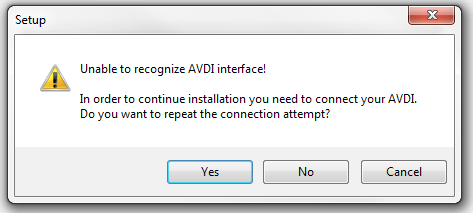
If you receive this message – please cancel the installation and start over once you have ensured that the AVDI is connected to the computer.
Usually the installation requires you to read the steps that are made and click “Next”.