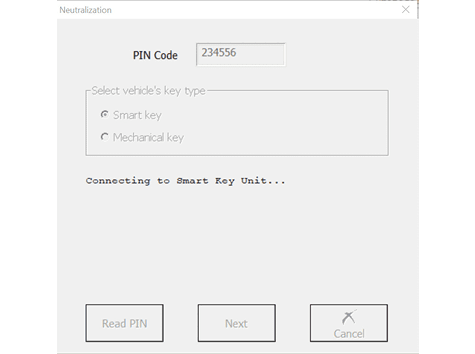
The Neutralization function allows the use of second-hand modules in Hyundai/Kia vehicles.
For vehicles with a smart key:
- neutralization (allowing adaptation in other vehicles) of the smart system
- neutralization (allowing adaptation in other vehicles) of the ECU
- neutralization (allowing adaptation in other vehicles) of the ESCL
- neutralization (allowing adaptation in other vehicles) of the PDM (for vehicles equipped with PDM)
For vehicles with a mechanical key:
- neutralization (allowing adaptation in other vehicles) of the immobiliser - this automatically neutralises the ECU as well
- neutralization (allowing adaptation in other vehicles) of the Smart module (for vehicles that are equipped with one)
Live data demonstrating the state of the modules (neutralized/active) and the number of initialized keys is shown in the function window.
Whenever neutralization is performed, the keys have to be re-learned to the vehicle after installing a neutralized module. To access the neutralization function, you can follow these three steps:
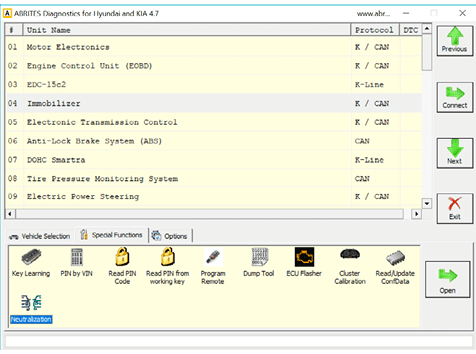
- Open the Hyundai/Kia software, followed by Neutralization:
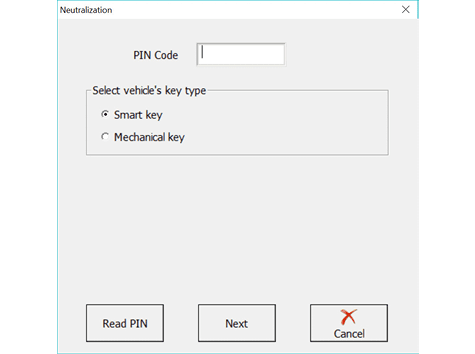
- Enter or read car’s PIN:
- Click next once the PIN is read and follow the software guidance: