In order to perform basic diagnostic operations such as module identification, reading and clearing of diagnostic trouble codes (DTC) and live data measurement the vehicle model should be selected.
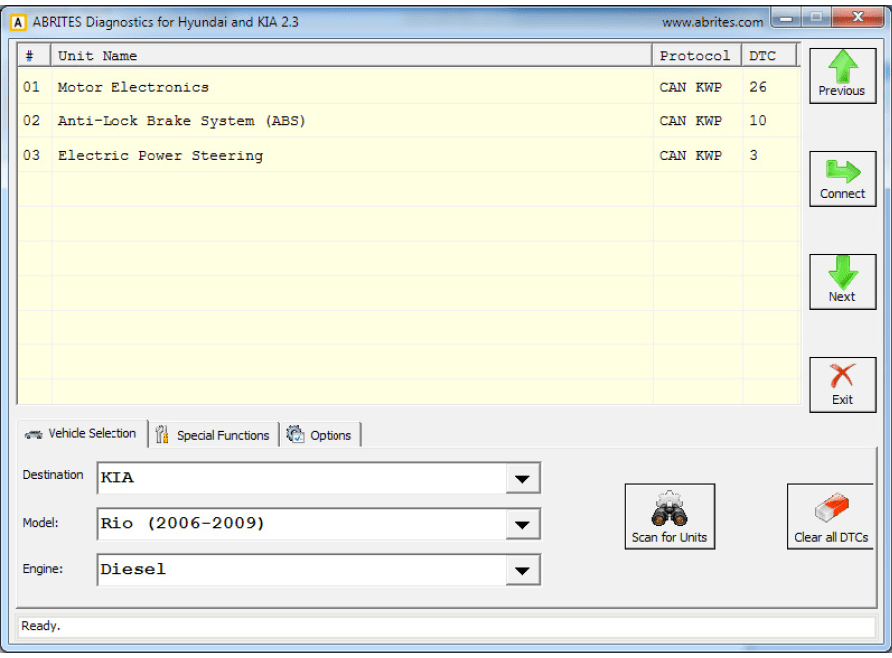
Once the vehicle is selected the Abrites diagnostics for Hyundai and Kia will display all the possible modules that may be integrated into this specific vehicle. It will display all the protocols in which these electronic components communicate.
In order to begin diagnostics the Scan for units button needs to be selected. Then the software will begin testing all the electronic modules. It will display them and the DTCs they contain.
Once the diagnostics is complete the user can choose to enter each specific electronic module within the tested vehicle.
-
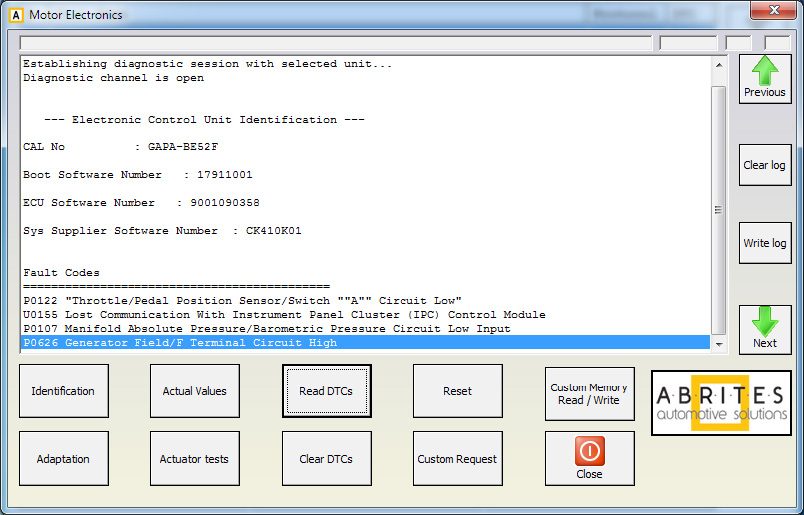
The Identification button will provide full module identification i.e. make, model, date of manufacturing, etc.
-
The Actual values button will show the actual values of the current vehicle in real time.
-
“Read DTCs” will show the current diagnostic trouble codes for the selected electronic module.
-
The Adaptation button will show the options for unit adaptation.
-
”Actuator tests” will allow the user to test various actuators within the selected electronic unit.
-
Clear DTCs will clear the diagnostic codes present in the module.
-
“Custom request” allows advanced users to send binary signals to the modules.
-
“Custom Memory Read/ Write” lets the user update the configuration of the unit.
-
“Reset” will reset the module.