This function enables unlocking/resetting batteries in Mercedes-Benz vehicles, including Mild Hybrid, Plug-in Hybrid, and Electric Vehicles (EVs).
It also allows reading and clearing Diagnostic Trouble Codes (DTCs) stored in the battery modules, provided that the faults are not permanent.
10.1 Connection Methods
10.1.1 Connection via OBD II Port (In-Vehicle)
-
Connect the AVDI interface to the vehicle’s OBD II diagnostic port.
-
Open the FBS4Manager software.
-
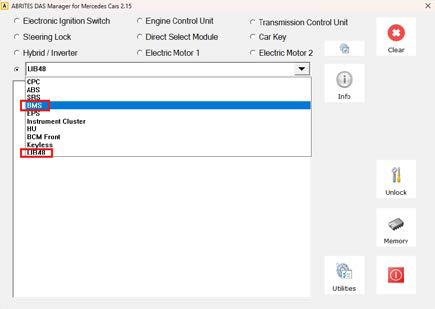
Select the appropriate control unit.
-
4.Proceed with the Unlock/Reset procedure.
10.1.2 On-Bench Connections
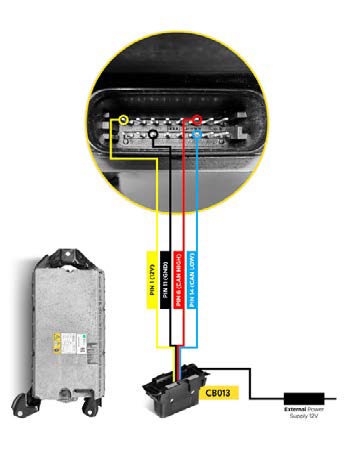
BMS222MH
CB013 Cable – required for connection to BMS units
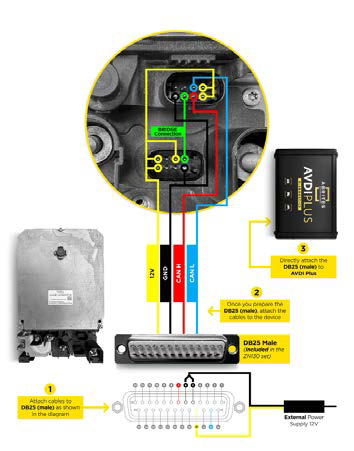
LIB48_222 Module
DB25 (Male) Connector – required for LIB48 modules
10.2 Procedure steps
-
Establish a proper connection to the selected unit (OBD II or on-bench).
-
Launch the FBS4Manager software.
-
Select the correct unit type from the dropdown menu.
-
Click the “Info” button to retrieve unit information and battery status.
-
Press the “Unlock” button to perform the unlock/reset procedure.
Important : After retrieving unit information, always verify the battery voltage.
If the module voltage is below 36V, the battery must be charged externally before proceeding.
When charging is required, the battery module should be disassembled.