To read the password from the W220/W215/R230 models you need to use the DAS Manager as with any other Mercedes that uses Infra-Red EZS. The option that needs to be selected is the Relay method once prompted. You can work both in the car or on bench. Below you can see the bench connections of the EZS.
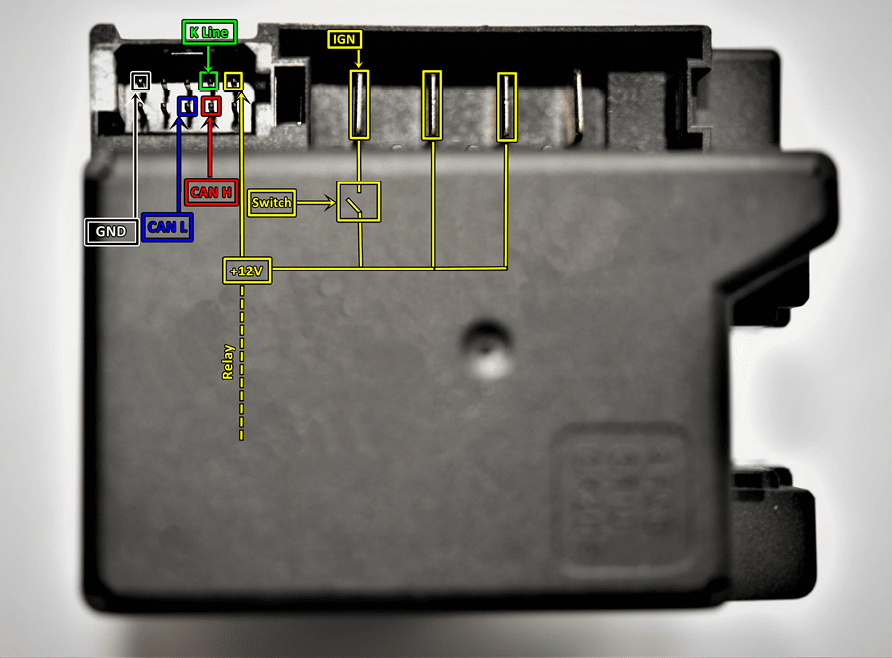
The EZS can be easily connected on bench with 3 methods, using the ZN151 DS-Box or the ZN041 Relay cables with a DB-25 connector or an OBD cable.
Method 1
Connecting the EZS directly to a ZN151 DS-Box. You need to prepare a couple of cables used to connect:
-
GND of the EZS goes to GND of the DS-Box. GND from the power supply is also connected to the GND socket
-
CH and CL of the EZS go to CAN 3-11 on the DS-Box
-
K-Line goes to K1 of the DS-Box
-
+12V from the EZS goes to the 2nd relay socket (right).
-
Additionally, you need to power-up the DS-Box and the EZS with +12V using the B+ socket and the 1st Relay socket (left).
Method 2
Connecting the EZS to the DS-Box Relay and a DB25 connector
-
GND of the EZS goes to DB25 pin5 and pin6
-
CH and CL of the EZS go to DB25 pin4(CH) and pin12(CL)
-
K-Line of the EZS goes to DB25 pin2
-
+12V of the EZS goes to DS-Box 2nd relay socket (right)
-
The DS-Box itself needs to be powered using the B+ and GND sockets
-
Pin17 of the DB25 goes to the 1st Relay socket (left) on the DS-Box
Method 3
Connecting the EZS to the DS-Box Relay and an OBDII cable connector
-
GND of the EZS goes to OBD pin4 and pin5
-
CH and CL of the EZS go to OBD pin3(CH) and PIN11(CL)
-
K-Line of the EZS goes to OBD pin1
-
+12V of the EZS goes to OBD 2nd relay socket (right)
-
The DS-Box itself needs to be powered using the B+ and GND sockets
-
Pin 16 of the OBD connector goes to the 1st Relay socket (left) on the DS-Box
Note: All of the above mentioned methods require a switch to be connected(the switch is used to turn on IGN when prompted by the software).
Note: if using the ZN041 Relay Cable set, make sure to connect K1 of the Relay to K7 of the DB25 cable.