Once the connections described under Requirements are in place, the synchronisation itself is short to start and then runs on its own for about 40 minutes.
Required equipment
- Abrites AVDI interface
- A working key - ignition has to be ON at the ID Code Box step
- An external power supply - the procedure runs about 40 minutes
Step‑by‑step procedure
1. Open the software
Start the Toyota Online software with the AVDI connected to the vehicle over the CB106 cable.
2. Select the special function
Choose the "ID Code Box" special function.
3. Start the synchronisation
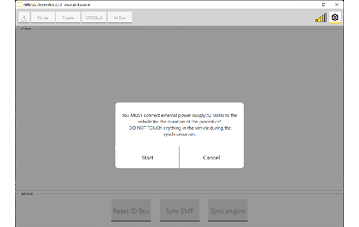
Press "Sync Engine".
4. Wait for it to finish
Do not touch anything in the vehicle during the procedure. Do not open doors, press the start button, operate the ignition or disturb the cables. The routine needs roughly 40 minutes to complete.
5. Verify
When the software reports completion, the vehicle should be fully functional. Confirm that the engine starts and that DTC B279986 is no longer stored.
Important notes
- The single most common cause of failure is interference during the 40-minute window – whether that is a door being opened, a key being pressed, or the power supply dropping.
- If the procedure is interrupted, re-check the connections and the power supply, then run it again from the start.
Troubleshooting
| Issue | Likely cause | Solution |
|---|---|---|
| "Sync Engine" is greyed out or missing | Wrong software or the vehicle has no ID Code Box | Confirm the vehicle is ID-Code-Box equipped and that the Toyota Online software is being used |
| Procedure aborts partway through | Power supply dropped, or something in the vehicle was operated | Connect a battery charger, leave the vehicle undisturbed, and repeat |
| B279986 still stored after completion | Synchronisation did not finish successfully | Clear the fault, re-check the OBDII connection, and run the procedure again |
| Engine still will not start | The immobiliser fault lies elsewhere (keys, ID Code Box itself) | Scan for further DTCs; consider ID Code Box Reset or Key Learning as appropriate |