Appendix A – Availability Live Data
| Electronic Control Unit | Note |
|---|---|
| ABS control module | CAN bus |
| Cruise Control Module | |
| Driver Door Control Module | |
| ECB Gateway | |
| Engine Control Module | |
| Electronic Transmission Control Module | |
| Hybrid Control Module | |
| Immobilizer | |
| Master Switch | |
| Passenger Door Control Module | |
| Rear Console | |
| Rear Left Door | |
| Rear Right Door | |
| Entry & Smart Access Module | |
| Steering Pad |
Appendix B – Special functions available from basic diagnostic session
| Function | Control Unit | Note |
|---|---|---|
| Immobilizer Reset | Immobilizer | |
| Register Key | Immobilizer/Smart Module/ECU | |
| Erase Keys | Immobilizer/Smart Module/ECU | |
| Synchronize | Immobilizer | Synchronization between immobilizer and smart unit |
| Smart Module Reset | Entry&Smart Access | |
| Remote Key Registration | Main Body | Registers remote key |
| Remote Key Deletion | Main Body | |
| Steering Lock Synchronization | Entry&Smart Access | Sync steering lock electronic with Smart Access Module |
| ECU Synchronization | Entry&Smart Access | Sync engine control module with Smart Access Module |
| ECT reset | Engine Control Module | Resetting learned values ECT |
| Leave After Sale | Entry&Smart Access | Cancel auto learning state (key learning) of the engine control module |
| Throttle Learn | Engine Control Module | Resetting learned values ECT |
| ABS reset | ABS | Reset learned values - should be used if ABS module or YAW rate/G sensor are replaced |
| ABS alignment | ABS | Reset learned values of ABS |
| Gateway reset | Gateway | Used to reset list with assembled in the vehicle control modules. Useful when some unit have been removed from vehicle (or added). |
| A/C Servo Motor Init | Air-condition | |
| EMPS Init | Power Steering |
Appendix C – Dump Tool available options
- Reset of the immobilizer
tokai rika eeprom 93C66 (texas 4D) tokai rika eeprom 93C66 encrypted (texas 4D or G-chip) valeo 24C04 (texas 4D) visteon 93C56
-
ID-box reset – 93C46
-
Smart Access Module reset – eeprom 93C66 or 93C86
-
Engine Control Unit reset (virgin)
-
Engine Control Unit mileages recalibration
-
Airbag Control Module – crash data clear
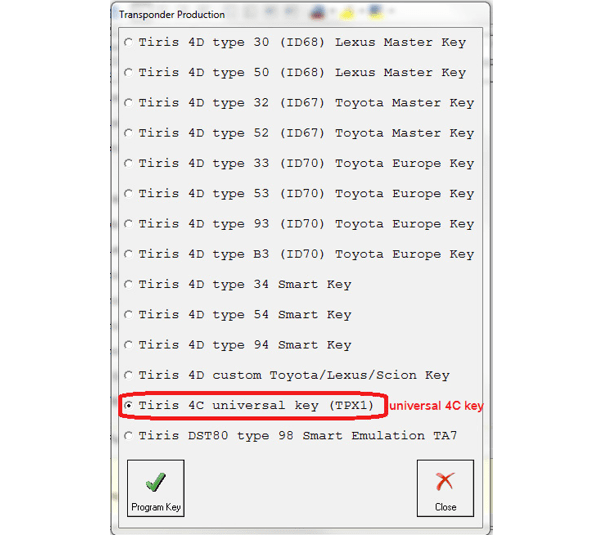
NOTE: For older model vehicles (those using an external IMMOBILIZER and a 4C type of key) All users are advices to use a universal key (this key can be generated via the production menu). Using this key the user can add a new key without removing the immo box.
It is advisable for everyone using the Abrites diagnostics for Toyota/ Lexus/ Scion to have such a key. Please note that you will need a PROTAG programmer for this production.
- Appendix to the procedures for smart key learning
Please follow the instructions as described below:
-
Please locate and remove the smart system (usually located behind the glovebox)
-
Read and save the 93C86 EEPROM from the smart system. Use a programmer
-
Open the Abrites diagnostics for Toyota - go to special function Transponder tool and select Transponder by dump.
-
Load the 93C86 EEPROM and the software will tell you what type of transponder you need
-
The software will modify the dump in a way that you will be able to have a master key. You need to write this modified dump to the Smart unit.
-
Now you have a master key and the car can be started.
-
Use the Key learning to learn a second key. You now have a master and slave key.
if you prefer to use virgin dumps follow the procedure bellow:
-
Be sure that smart system and ID box are virgin
-
Connect units to the vehicle DO NOT TOUCH START BUTTON!
-
Connect Abrites Diagnostic for Toyota and select function “Key Learning” - DO NOT TOUCH START BUTTON just leave the door open.
-
Register 2 keys (follow instruction on the display)
-
Disconnect the AVDI
-
Close driver door and try each remote
-
Open driver door
-
Turn ignition ON (for first time)
-
Short PIN 4 and PIN 13 of the OBDII for 45 minutes
-
Turn OFF ignition
-
Remove the link between pin 4 and pin 13
-
Close the door
-
Open and close 6 times with each remote control
-
Leave the vehicle for 5 minutes locked -> units are synchronized
- Appendix to the remote/keyless part programming for smart key learning
(2003-2009 models)
Please follow the instructions as described below:
-
Close all doors except driver’s
-
Insert and remove key from slot twice
-
Close, Open, Close, Open driver’s door
-
Insert and remove key from slot
-
Close, Open, Close, Open driver’s door
-
Insert key in slot
-
Close driver’s door
-
Turn IGN ON and OFF
-
Remove key from slot - door locks cycle
-
Press and hold the lock and unlock button for 1 second, release and then press lock button for 3 seconds
-
Locks cycle
-
Open, Close, Open driver’s door
Note: This procedure is valid for the oldest keyless-entry system (e.g. Toyota Prius second generation XW20 2003-2009 ).