Programming instrument clusters from Magneti Marelli (K-line diagnostic link).
Instrument cluster from Audi A3, Audi A6, Audi TT, VW New Beetle
Access to these is possible using the types “Instrument Cluster Magneti Marelli - Direct 1996-2000” and “Instrument Cluster Magneti Marelli - Direct 2000+” depending on production year of the car. So you have to select the one of the types and then try to read the EEPROM.
Please note that the threshold of the year 2000 is not absolute, some models are equipped with older instruments even if they are built after the year 2000.Choose the “Instrument Cluster Magneti Marelli - Direct 1996-2000”, if not successful you need to turn the ignition OF and ON and to try with the “Instrument Cluster Magneti Marelli - Direct 2000+” type.
If the read is successful , the PIN code and mileage are automatically recognized and displayed for Magneti Marelli direct types, in case of error you can do it by yourself using the description below:
1.In the EEPROM search for the Immobilizer number (AUZ…, WAUZ…). If the immobilizer number is found, then the login is the two bytes preceding the immobilizer number.
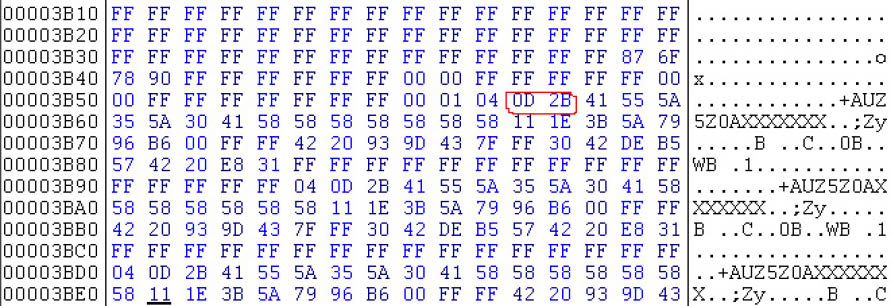
E.g. on the picture above the immobilizer number is AUZ5Z0AXXXXXXX and the login is “0D2B” in hexadecimal or 3371 in decimal
2.If the immobilizer number is not present, then the login is located somewhere in the region of 0x0070- 0x009F in the EEPROM. Starting from 0x0070 in the EEPROM (i.e. 0x3870 in the memory area) there should be a long sequence of 0xFF (e.g. about 7-8 bytes of 0xFF). The first two bytes which are not 0xFF should be the login.
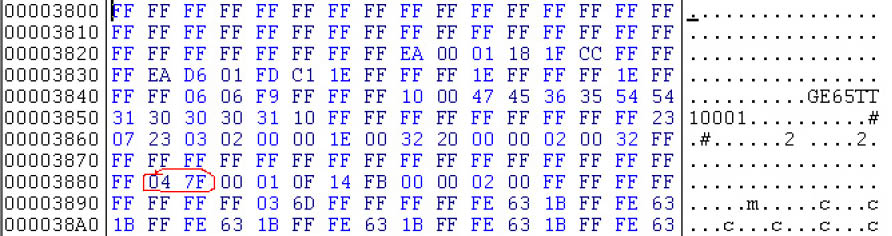
E.g. on the picture above starting from address 0x0080 of the EEPROM there are 17 bytes with 0xFF, then comes the login which is 0x047F in hexadecimal or 1151 in decimal.
The mileage consists of two blocks – usually 0x90 bytes with the inverted mileage, followed by 0x90 bytes with the real mileage, it might vary (e.g. blocks with 0x98 bytes instead 0x90, or first comes the real value and then the inverted).
Instrument cluster from Audi TT-K
First try to access the instrument as one of the “Magnet Marelli direct” types (especially for year 2000+) and if successful proceed as described above
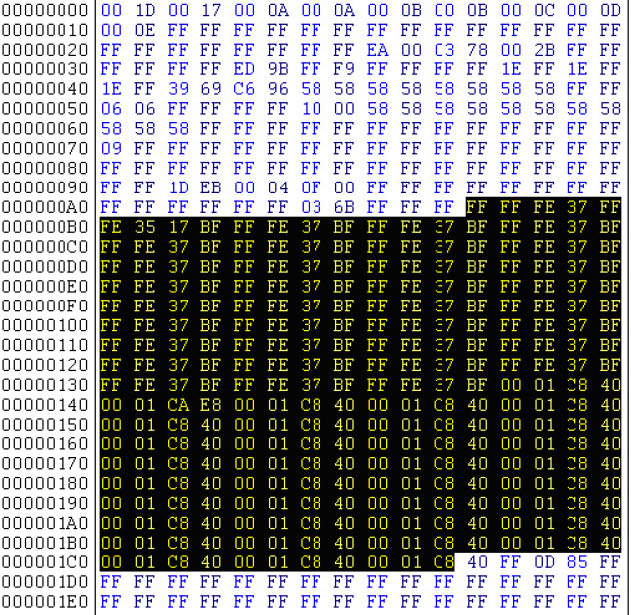
If not successful select type “Magneti Marelli - Shadow 3 (TT)” and read EEPROM. Currently for the software versions we know the login can be located as described above, and the mileage starts from address 0xAA to address 0x1C8 (marked in the picture below).
VW Passat - usually these Instruments are before 1998
First try to access the instrument as one of the “Magnet Marelli direct” types (especially for year 2000+) and if successful proceed as described above
If not select type “Magneti Marelli - Shadow 2 (Passat)” and read EEPROM. The login is displayed; mileage is displayed as “0”.
VW New Beetle
First try to access the instrument as one of the “Magnet Marelli direct” types (especially for year 2000+) and if successful proceed as described above
If not select type “Magneti Marelli - Shadow 1” and read EEPROM. The login is not displayed. The mileage is displayed as “0”.
Porsche Cayenne/VW Touareg gasoline engines – ECU wakeup fuses
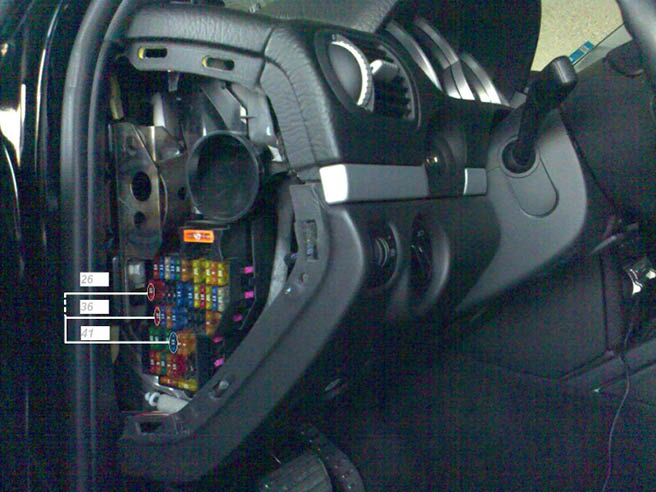
Porsche Cayenne – fusebox
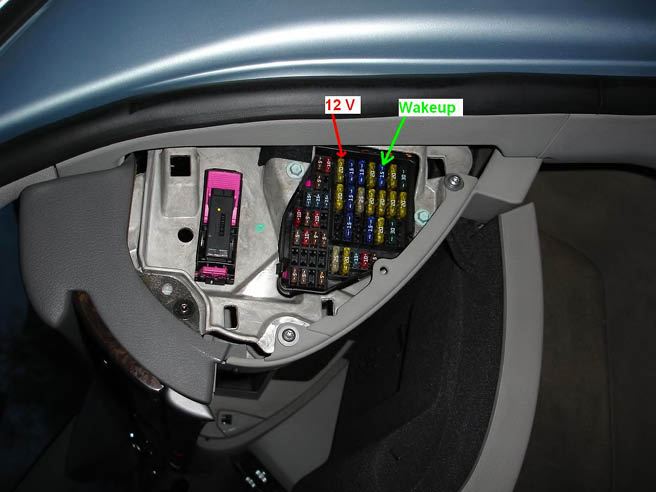
Audi A8 fusebox (passenger side – wakeup ECU)
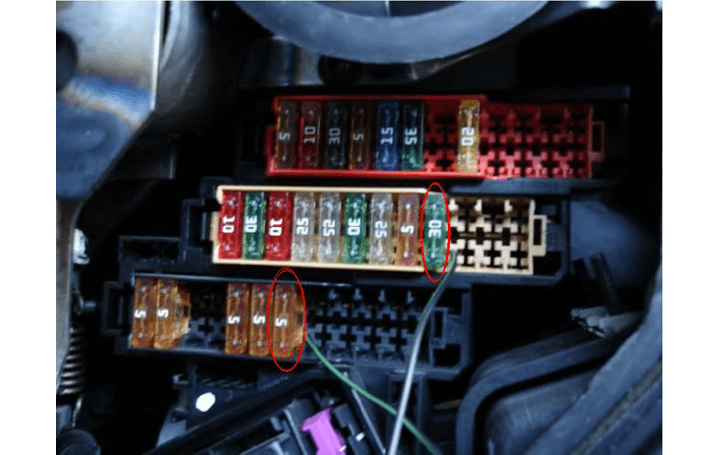
Audi Q7
To get communication with the ECU you need to short the fuses as shown in the picture below: If you cannot communicate with the ECU then you should try as on the picture below:
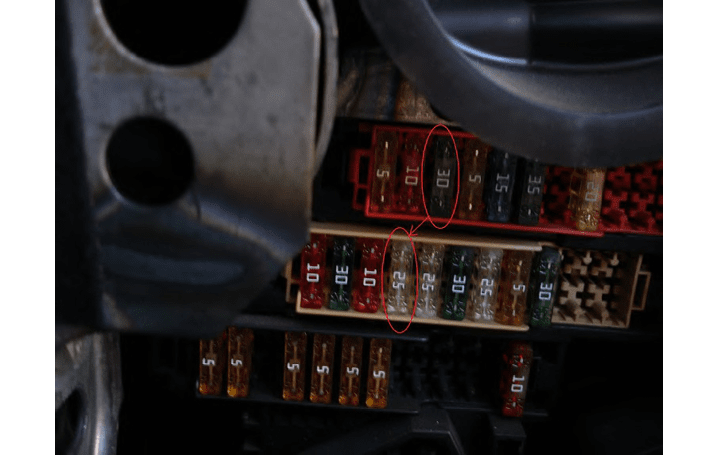
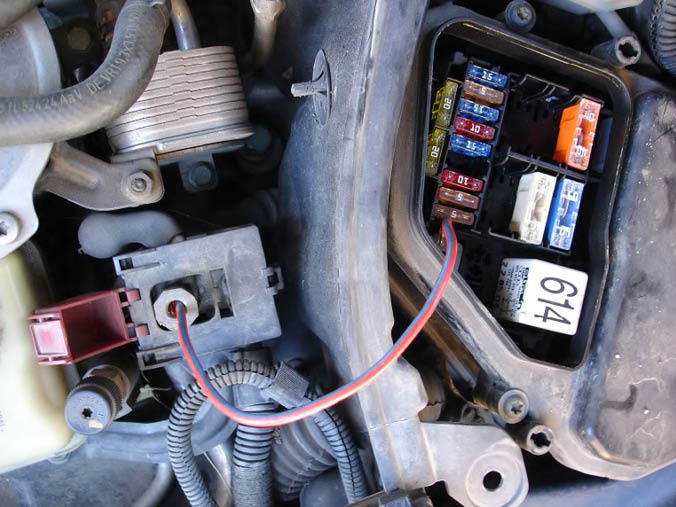
If you are still not able to get communication with the ECU it is possible to make short of theexternal fusebox (it is found under the front cover, where the engine is). You have to short the first 5A fuse with the +12V connection as shown on the picture. Please pay attention that you have to use a bigger cable because if you use a small cable it can heat up.
Audi A6/RS6 (except 3.2L)
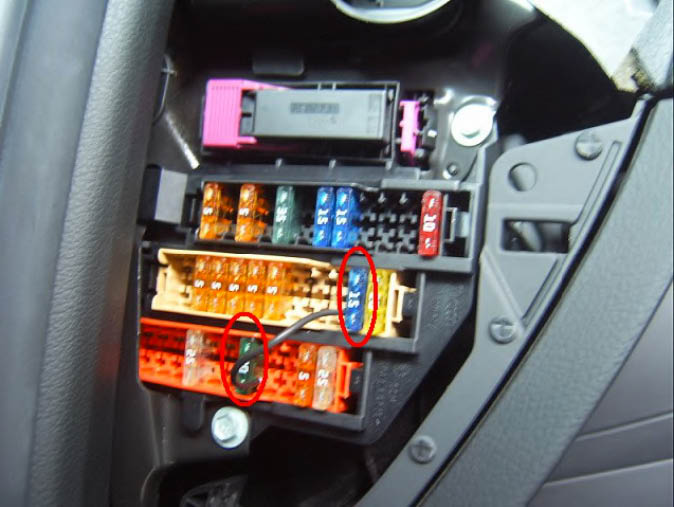
To get communication with the ECU you need to short the fuses as shown on the picture below:
Audi A6 3.2L FSI
Dump tool special function
The dump tool receives a dump file from the corresponding unit (input dump is loaded with the “Load dump” button) as an input. The dump file might have been read either via OBDII or with a programmer (especially for units where reading via OBDII is not possible). As an output the dump tool displays data extracted from the input file and/or makes modifications to the input data. If any modifications were made (for some sub-functions there are no modifications made, only data is visualized) the user has to write the modified dump to a desired file (with the “Save dump” button), and then this modified dump should be saved back to the device via OBDII or with a programmer. If data is read/write with a programmer the user must take care to ensure that the proper byte order is used. Because most of the programmers are reading the data in 16bit words, the byte order in the dump depends on the used programmer – some programmers are producing dumps starting with the least significant byte, and some are producing dumps starting the most significant byte. This means that for the same unit two different programmers can produce different dumps. Normally the software tries to autodetect the byte order of the dump, and if it does not succeed, then you might need to use the “Swap bytes” button. This button changes alternatively the byte order into the dump. So if after loading the dump file into the dump tool data cannot be extracted or modified, or the extracted data is not valid (e.g. displayed PIN is not accepted from the car), please try to swap bytes to get a result. For some functions the swapping is made automatically (for example the decoding of the Kessy), but for some function the user has to do this manually.
A more detailed description of the most important functions follows below
- IMMO - KESSY - Audi A8, VW Touareg, VW Phaeton, Porsche Cayenne, Bentley Continental 93C86 Required license: AN003 This function is used to extract the security code from the Kessy module (this module is used in Audi A8, VW Touareg, VW Phaeton, Porsche Cayenne and Bentley Continental). The function also displays the learned keys and visualizes/changes the immobilizer and VIN numbers.
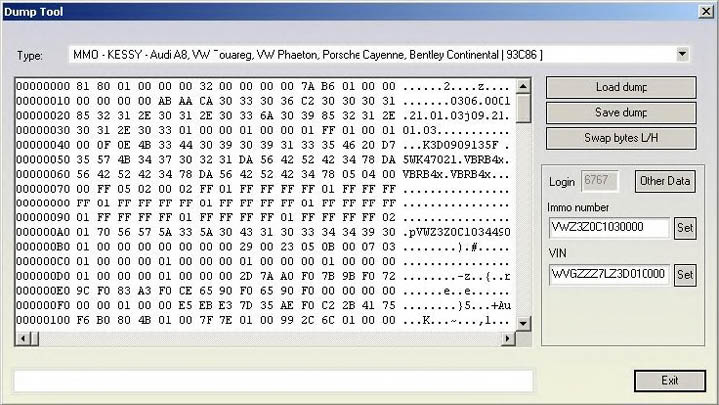
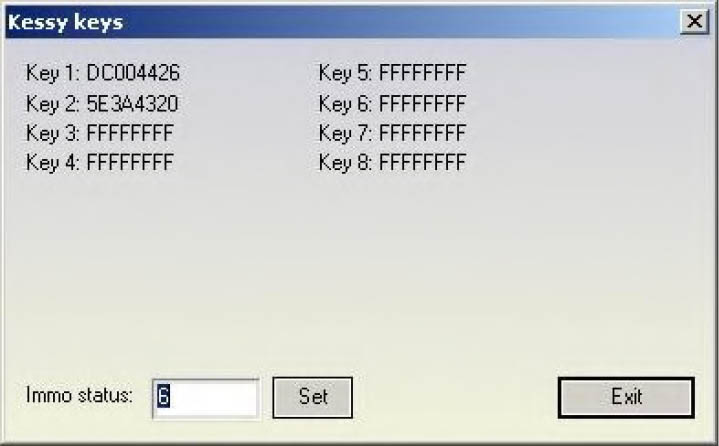
Pressing the “other data” displays the learned keys and also allows changing the immobilizer status (on some models changing the immobilizer status is used to put the Kessy e.g. into delivery condition).
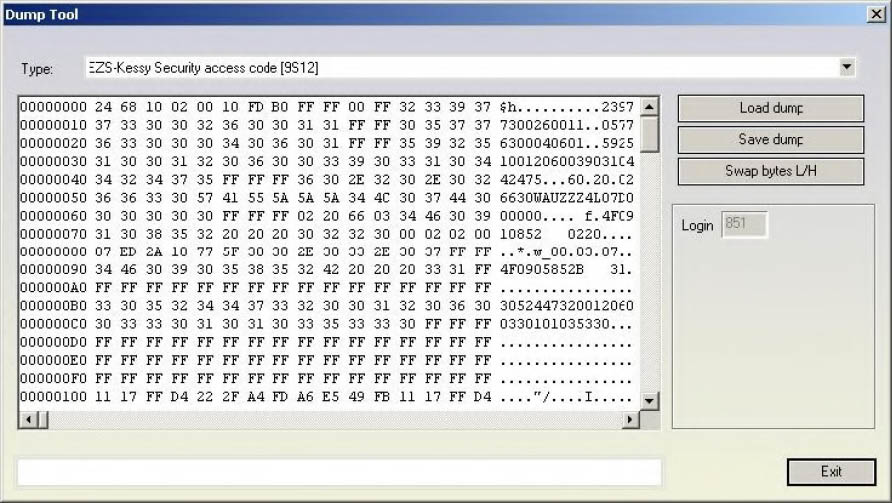
- EZS-Kessy Security access code 9S12
Required license: AN003
This function is used to extract the security access code from the EZS-Kessy. The EEPROM of the EZS-Kessy is found inside the microcontroller (Motorola HC9S12 family) and is typically read with a programmer, for some older version of the EZS-Kessy (till V2.0.2 of the EZS-Kessy) is also possible to be read by OBDII.
- Comfort module component protection data (Passat B6)
Required license: AN009
This function is used to extract the 7bytes of the component protection data for Passat B6. This function requires a dump file from the comfort module, and the six bytes of the component protection bytes which are always found in the engine control unit. So you need to load the dump of the comfort module and then a dialog is displayed where you can put the six bytes of the component protection manually or you can directly load the ECU dump too. The tool accepts an ECU dump from EDC16, PPD1x, MED9x and ME7x ECUs.
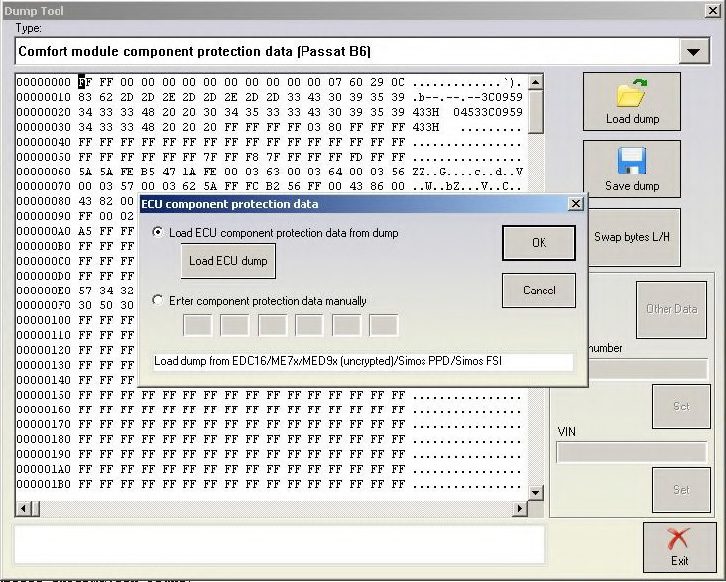
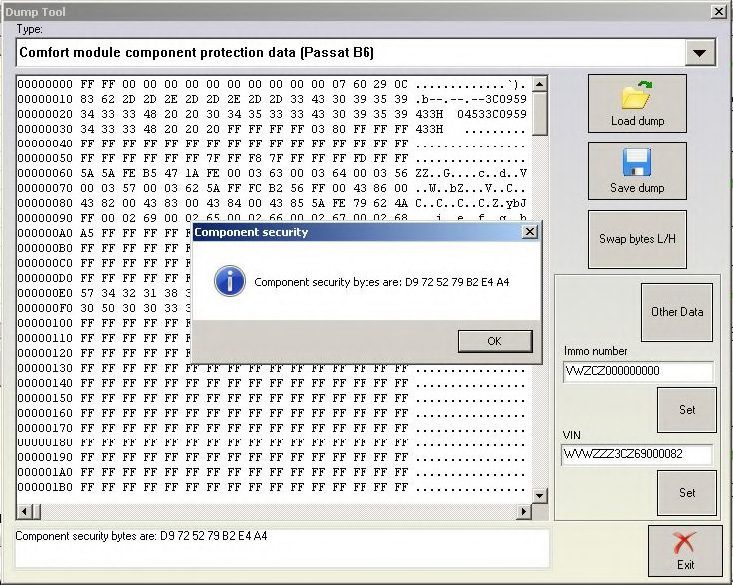
The function also visualizes/changes the immobilizer and VIN numbers
Pressing the “other data” displays the learned keys and allows several operations
-
If a programmer has been recognized, it allows to read current transponder’s data, add it to the dump and if transponder’s type is appropriate allows to program it as dealer key
-
It allows to change the immobilizer status (on some models changing the immobilizer status is used to put the Comfort module e.g. into deliver condition).
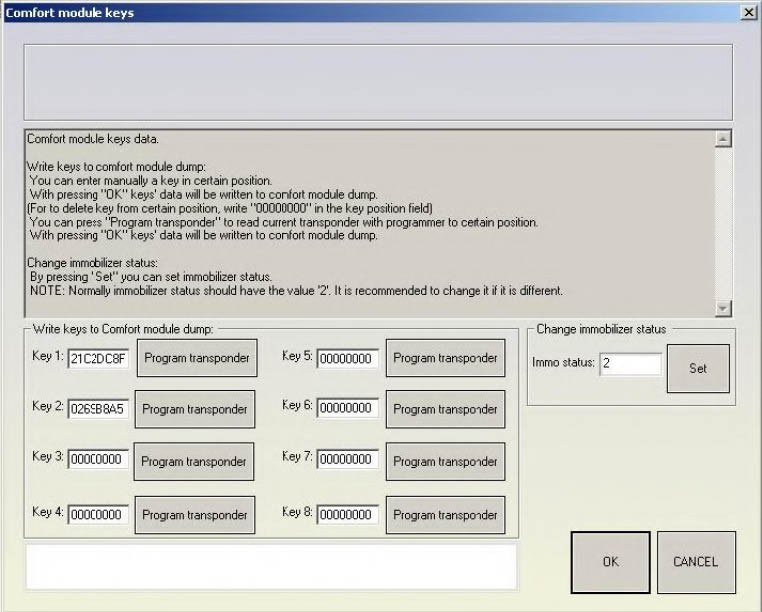
Keys with data “00000000” represent the empty positions in the dump file (position at which no key is learned). The rest are already occupied and represent the data of the learned at the respective positions keys.
By pressing the “Program transponder” button (and if a programmer is recognized) the current transponder is read and it’s data is written at the corresponding (to the pressed button position) position in the dump file (for example pressing “Program transponder” button next to “Key 4:” data will write transponder’s data at position 4 in the dump).
After current transponder is read, if its type is appropriate (TA3), it is also allowed to program transponder as dealer key. You will be asked whether you like to do it.
In short if you put a TA3 transponder and program it to a specified position, the car should start without making any key-learning procedure.
By pressing OK, all changes in the dumps data will be saved.
By pressing CANCEL, the loaded dump will remain unchanged.
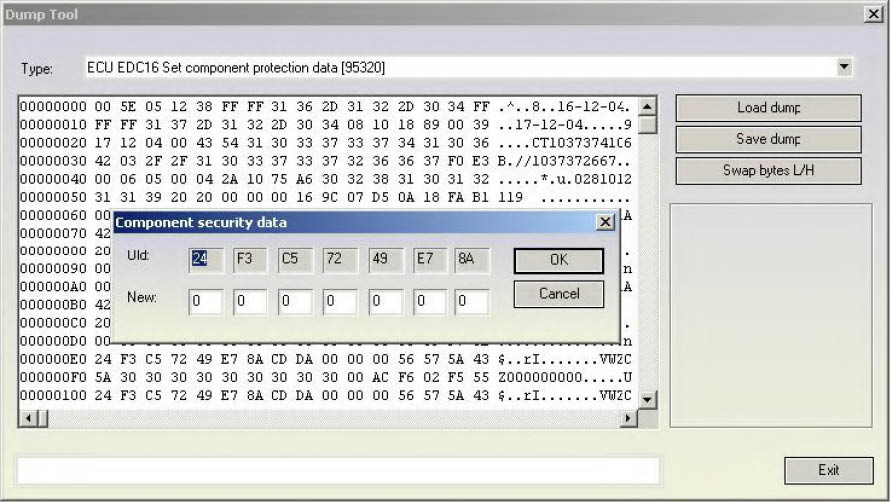
- ECU EDC16 Set component protection data 95320
Required license: AN009
This function allows viewing and/or changing the component protection data found in the EDC16. Into the EDC16 there are at least 6 bytes of the component protection found, or sometimes there are 7 bytes. If there are 6 bytes contained, then the 7th byte is zero.
- ECU EDC16 Immo bypass 95320
Required license: None
This function is used to make the so called “Immobilizer bypass”. Bypassing the immobilizer means that the ECU start the engine even if the immobilizer is not allowing the engine start (e.g. due to a wrong key or wrong synchronization between the immobilizer and the ECU)
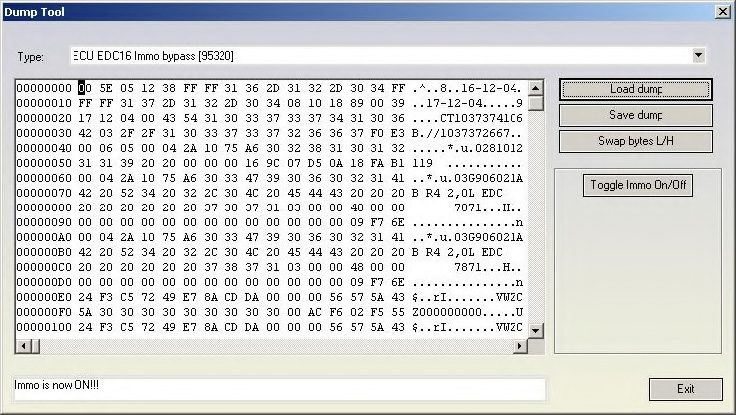
The “Toggle Immo On/Off” button allows to switch on/off alternatively the bypass function.
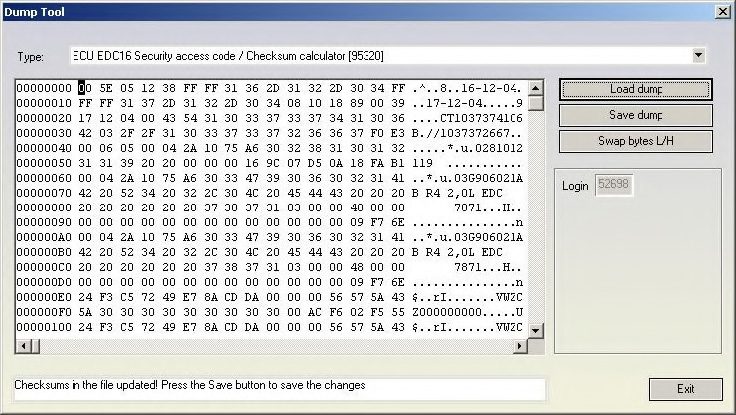
- ECU EDC16 Security access code / Checksum calculator 95320
Required license: None
This function displays the security access code which is contained into the EDC16 unit. It also calculates and fixes (if some of them are incorrect) the checksums of the EEPROM. Please pay attention that the checksums are calculated for the area till address 0x180 because after that area the EEPROM sections are different for each different software version of the EDC16 unit.
Fortunately the most of the interesting data are found in this section.
- ECU MED 9.x Reset component protection data 95160
Required license: AN009
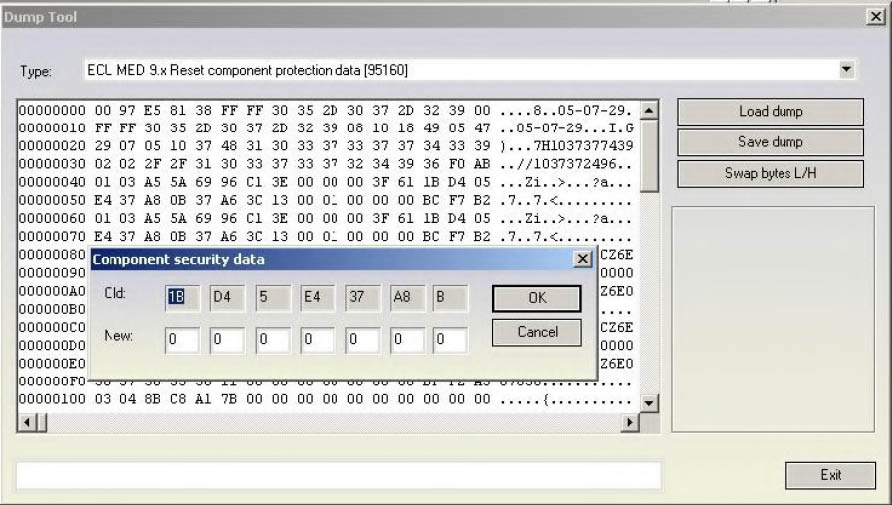
This function allows viewing and/or changing the component protection data found into the MED9x with ST95160 serial EEPROM. Into the MED9x there are at least 6 bytes of the component protection found, or sometimes there are 7 bytes. If there are 6 bytes contained, then the 7th byte is zero. Please pay attention that for some MED9.1 ECUs the data (security access code and component protection data) are encrypted and in that case they are incorrectly displayed. You can recognize whether the EEPROM data are encrypted by trying to put the visualized security access code to some detail (e.g. ECU or immobilizer)
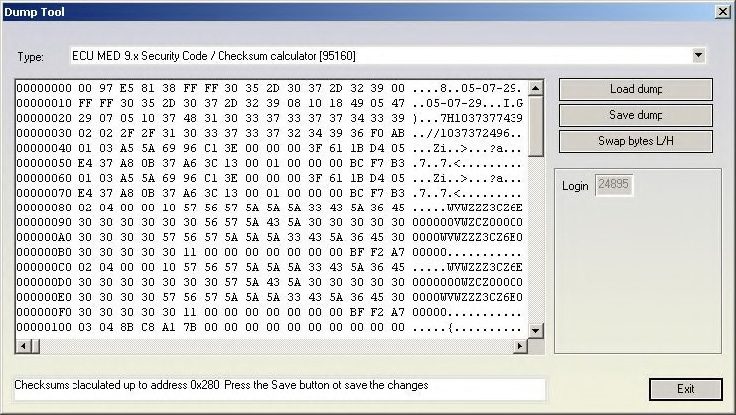
- ECU MED 9.x Security Code / Checksum calculator 95160
Required license: AN003
This function displays the security access code which is contained into the MED9x unit with ST95160 serial EEPROM. It also calculates and fixes (if some of them are incorrect) the checksums of the EEPROM. Please pay attention that the checksums are calculated for the area till address 0x280 because after that area the EEPROM sections are different for each different software version of the MED9 unit. Fortunately most of the interesting data is found in this section. Please pay attention that for some MED9.1 ECUs the data (security access code and component protection data) are encrypted and in that case they are incorrectly displayed. You can recognize whether the EEPROM data are encrypted by trying to put the visualized security access code to some detail (e.g. ECU or immobilizer)
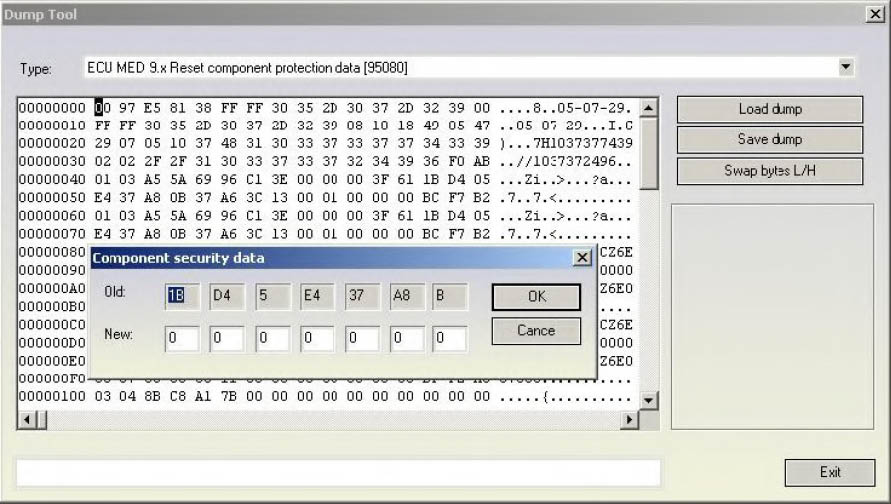
- ECU MED 9.x Reset component protection data 95080
Required license: AN009
This function allows to view and/or change the component protection data found in the MED9x with ST95080 serial EEPROM. Into the MED9x there are at least 6 bytes of the component protection found, or sometimes there are 7 bytes. If there are 6 bytes contained, then the 7th byte is zero. Please pay attention that for some MED9.1 ECUs the data (security access code and component protection data) is encrypted and in that case they are incorrectly displayed. You can recognize whether the EEPROM data are encrypted by trying to put the visualized security access code to some detail (e.g. ECU or immobilizer)
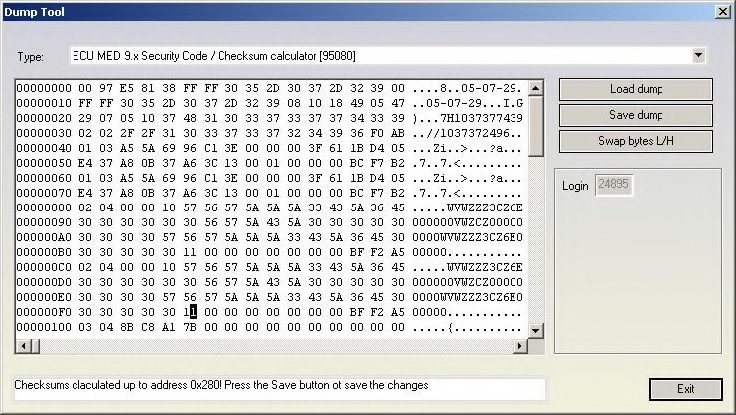
- ECU MED 9.x Security Code / Checksum calculator 95080
Required license: AN003
This function displays the security access code which is contained into the MED9x unit with ST95080 serial EEPROM. It also calculates and fixes (if some of them are incorrect) the checksums of the EEPROM. Please pay attention that the checksums are calculated for the area till address 0x280 because after that area the EEPROM sections are different for each different software version of the MED9 unit. Fortunately the most of the interesting data are found in this section. Please pay attention that for some MED9.1 ECUs the data (security access code and component protection data) are encrypted and in that case they are incorrectly displayed. You can recognize whether the EEPROM data are encrypted by trying to put the visualized security access code to some detail (e.g. ECU or immobilizer)
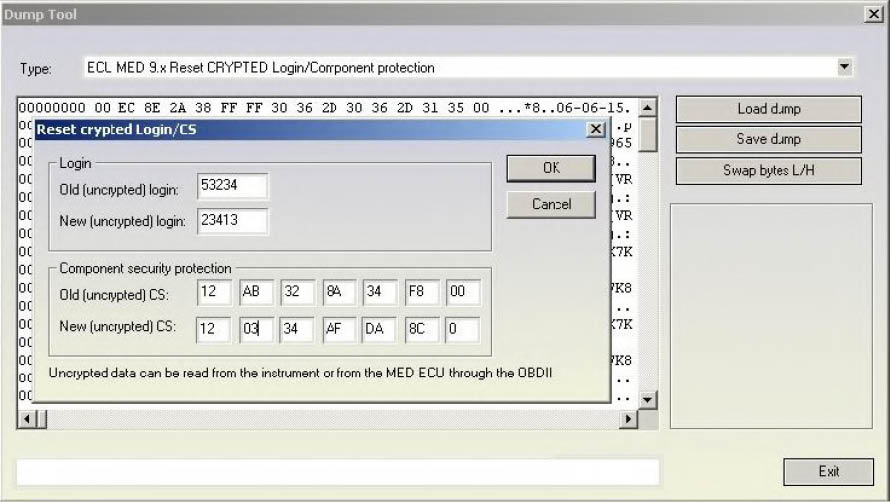
- ECU MED 9.x Reset CRYPTED Login/Component protection
Required license: AN009
The function allows changing the security access code and the component protection data into MED9.1 ECUs for which the EEPROM is encrypted. As mentioned previously for some MED9.1 ECUs the data (security access code and component protection data) are encrypted and in that case they are incorrectly displayed. You can recognize whether the EEPROM data are encrypted by trying to put the visualized security access code to some detail (e.g. ECU or immobilizer). Changing the security access code and the component protection data into the ECU requires that the original (uncrypted) data are entered. These data can be read e.g. from the Immobilizer/Instrument if possible and are entered into the “Old” fields. E.g. for Audi RS4 the MED9.1 ECUs are with encrypted EEPROM, but the login and component protection data can be taken from the RB8 instrument cluster.
- ECU MED 9x Immo bypass
Required license: AN012-B
This function allows you to make a immobilizer bypass for the MED9 engine control units. It works on the unencrypted engine control units, but also on the encrypted too, but on some encrypted engine control units it might not work.
ATTENTION: For the encrypted MED9.x ECUs it is necessary to make changes in the flash too! So after you will need to give also the ECU flash and EEPROM as input, and after the modifications to write back the modified flash and EEPROM to the ECU. Unencrypted MED9x require only EEPROM changes. It is automatically recognized whether the ECU is encrypted or not.
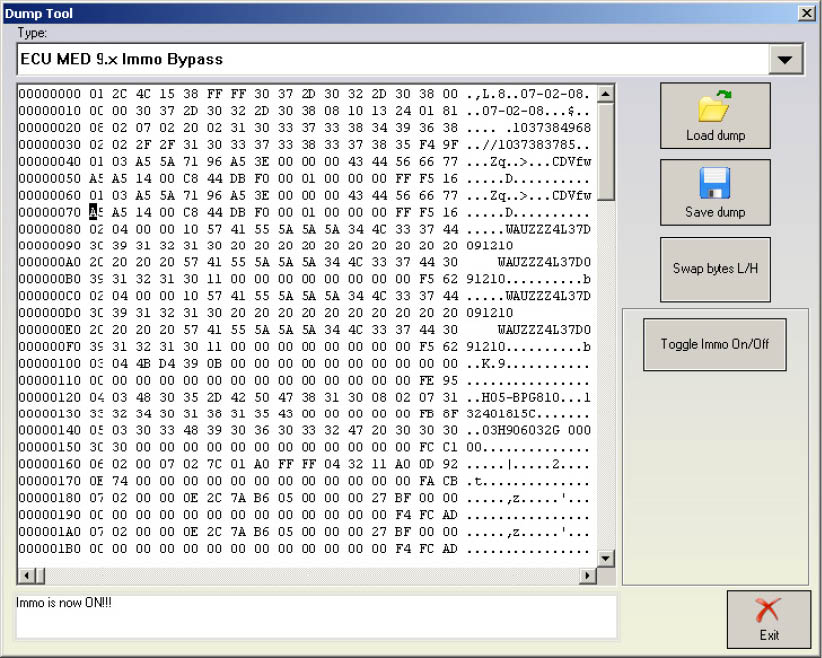
- ECU ME 7.x Set component protection data 9P08/95080
Required license: AN009
This function allows viewing and/or changing the component protection data found into the ME7x ECUs. Into the ME7x there are at least 6 bytes of the component protection found, or sometimes there are 7 bytes. If there are 6 bytes contained, then the 7th byte is zero.
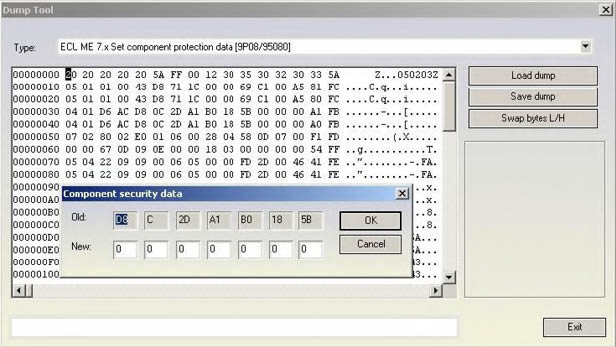
- ECU ME 7.x Security Code / Checksum calculator 9P08/95080
Required license: None
This function displays the security access code which is contained into the ME7 unit. It also calculates and fixes (if some of them are incorrect) the checksums of the EEPROM. Please pay attention that the checksums are calculated for the area only for the first 0x120 bytes because after that area the EEPROM sections are different for each different software version of the ME7x unit. Fortunately the most of the interesting data are found in this section.
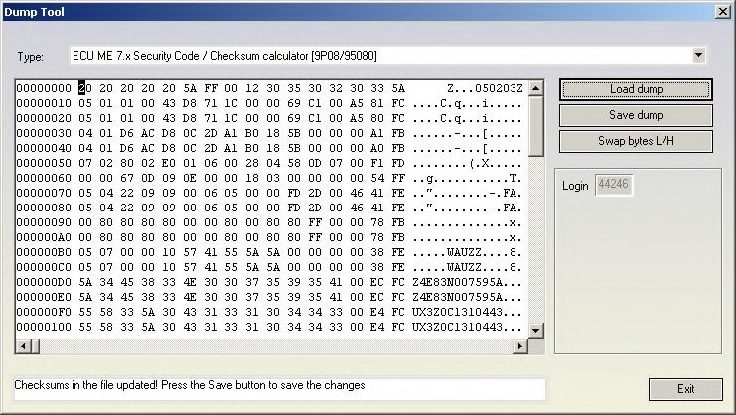
- ECU EDC15 Immo bypass 24C04
Required license: None
This function is used to make the so called “Immobilizer bypass”. Bypassing the immobilizer means that the ECU start the engine even if the immobilizer is not allowing the engine start (e.g. due to a wrong key or wrong synchronization between the immobilizer and the ECU)
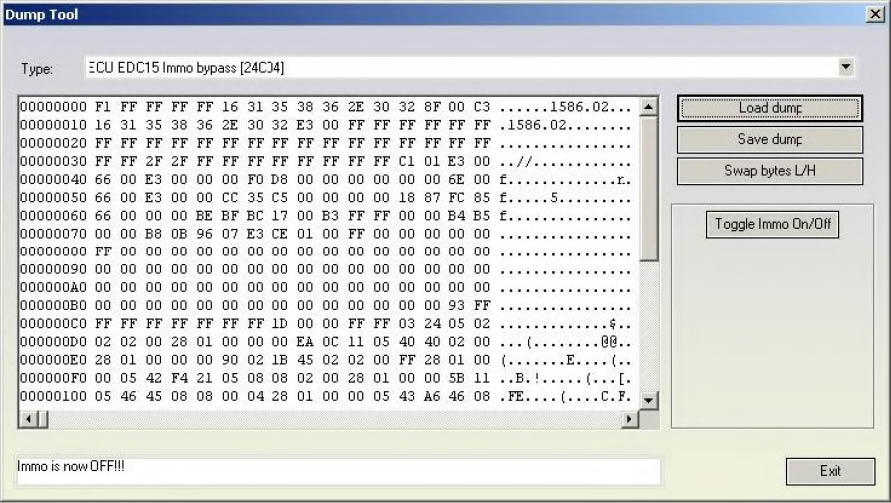
The “Toggle Immo On/Off” button allows to switch on/off alternatively the bypass function.
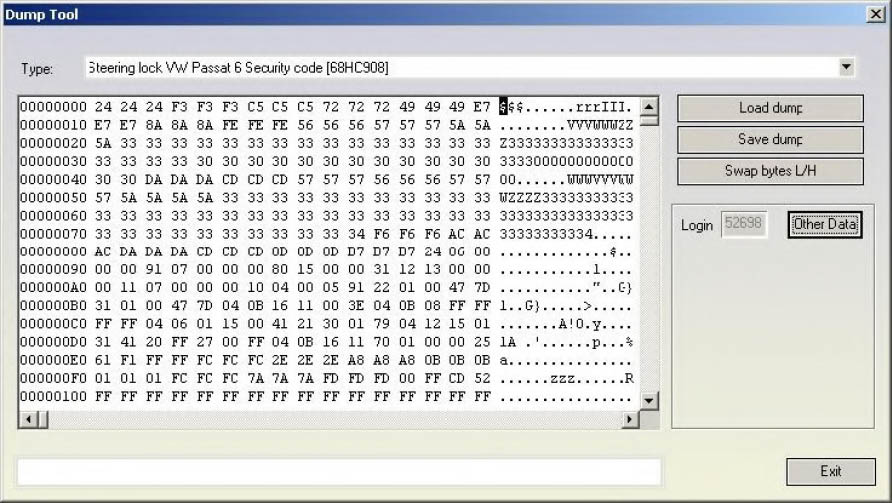
- Steering lock VW Passat 6 Security code 68HC908
Required license: AN003 to view security access code and AN009 to view component protection data. This function displays the security access code contained into the steering column locks of Passat B6 which are with Motorola microcontroller (the unit can be either with ELMOS or Motorola microcontroller). The function displays also the component protection bytes by pressing the “Other data” button”.
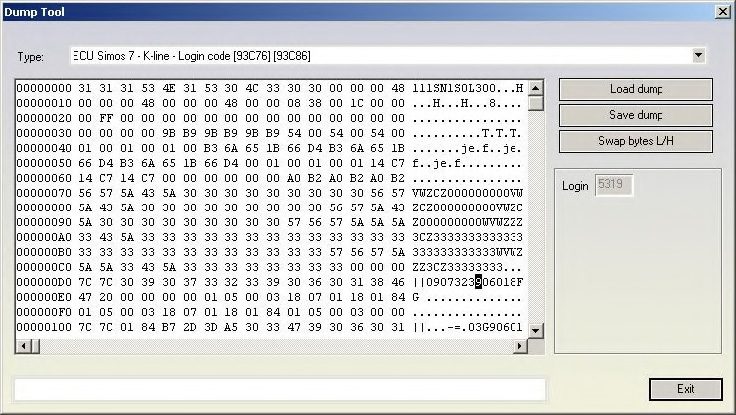
- ECU Simos 7 - K-line - Login code 93C76 93C86
Required license: AN006
This function displays the security access code contained into the engine control unit from Siemens ECUs (Simos 7x generation which are accessed through K-Line) for benzine engines. Interesting for these ECUs is that the same ECU can be used through K-Line and CAN, and depending which link is used the security access code which is accepted from ECU is different.
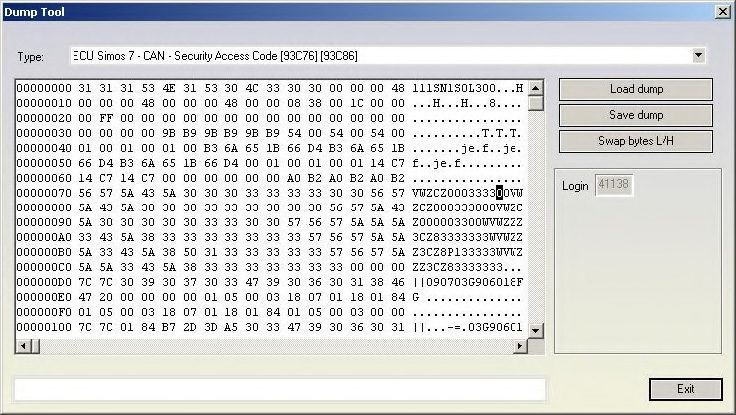
- ECU Simos 7 - CAN - Security Access Code 93C76 93C86
Required license: AN003
This function displays the security access code contained into the engine control unit from Siemens ECUs (Simos 7x generation which are accessed through CAN) for benzine engines. Interesting for these ECUs is that the same ECU can be used through K-Line and CAN, and depending which link is used the security access code which is accepted from ECU is different.
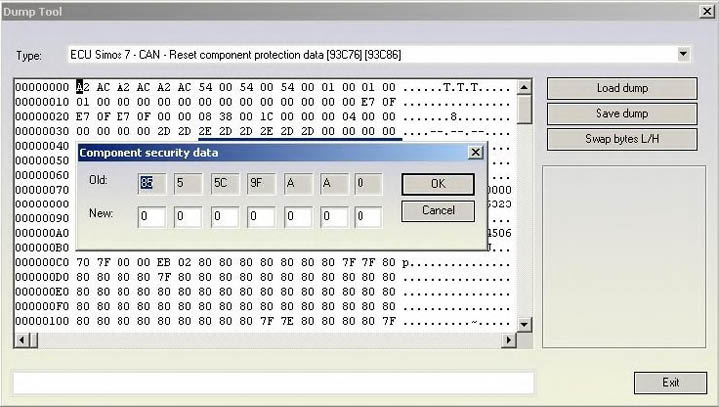
- ECU Simos 7 - CAN - Reset component protection data 93C76 93C86
Required license: AN009
This function allows viewing and/or changing the component protection data found in the Siemens ECUs (Simos 7x generation which are accessed through K-Line or CAN) for benzine engines. Into the Simos 7x there are at least 6 bytes of the component protection found, or sometimes there are 7 bytes. If there are 6 bytes contained, then the 7th byte is zero.
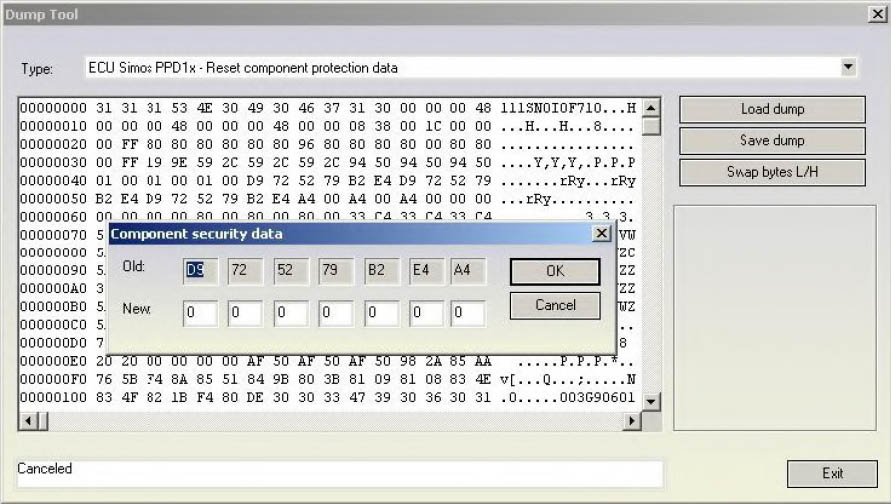
- ECU Simos PPD1x - Reset component protection data
Required license: AN009
This function allows viewing and/or changing the component protection data found into the Siemens ECUs (Simos PPD1x generation) for diesel engines. Into the PPD1x there are at least 6 bytes of the component protection found, or sometimes there are 7 bytes. If there are 6 bytes contained, then the 7th byte is zero.
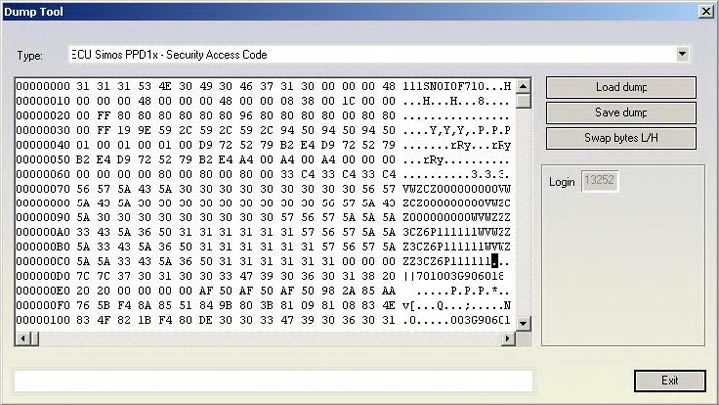
- ECU Simos PPD1x - Security Access Code
Required license: AN007
This function displays the security access code contained into the engine control unit from Siemens ECUs (PPD1x generation) for diesel engines.
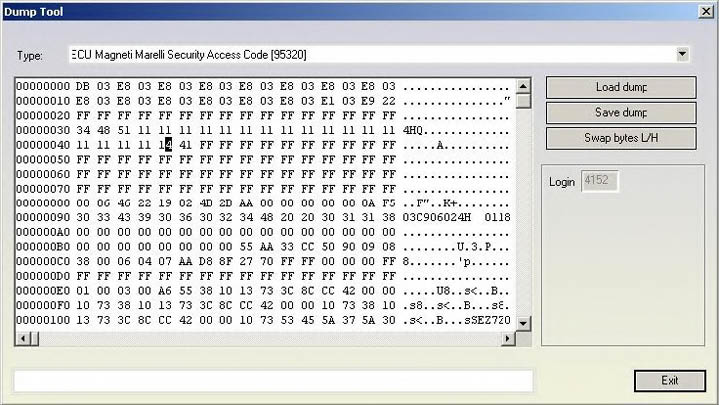
- ECU Magneti Marelli Security Access Code 95320
Required license: AN003
This function displays the security access code contained in the engine control unit from Magneti Marelli
- Audi A8 (-2002) - Security access code, Program transponder 24c17
Required license: AN006 to view security access code and AN009 to write transponder’s data to dump. The function visualize the security access code and also the immobilizer and VIN numbers. It also gives the opportunity to change the immobilizer and VIN numbers.
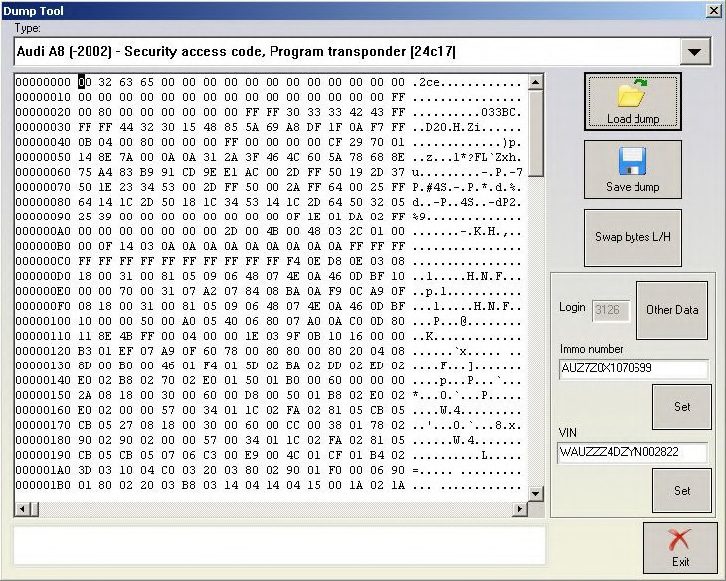
Pressing the “other data” button displays the learned keys and if a programmer has been recognized, allows to read current transponder’s data and add it to the dump.
With pressing a “Program transponder” button (and if a programmer is recognized) the current transponder is read and it’s data is written at the corresponding (to the pressed button position) position in the dump file (for example pressing “Program transponder” button next to “Key 4:” data will write transponder’s data at position 4 in the dump).
You should use transponder TP08.
By pressing OK, changed data will be written into the dump.
By pressing CANCEL, the loaded dump will remain unchanged.
After you have done all the modifications you wish, you have to press “Save dump” for to save the changes in the dump.
-
Audi A3/A4/A6 UKNSI 1995-1997 mileage and login code 93C56 – displays the login and calculates mileage. No license required.
-
Audi A3/A4/A6 UKNSI 1997-1998 mileage and login code 93C56 – displays the login and calculates mileage. No license required.
-
Audi A3/A4/A6 UKNSI Japan mileage and login code 93LC56 – displays the login and calculates mileage. No license required.
-
Audi 100 VDO 1995 mileage 94C46 – calculates mileage. No license required.
-
Golf 3 VDO 1995 mileage 93C46 – calculates mileage. No license required.
-
Golf 3 VDO V3.9 mileage 93C46 – calculates mileage. No license required.
-
Golf 3 Diesel mileage 93C46 – calculates mileage. No license required.
-
Golf 3 Motometer V5.8 mileage 93C56 – calculates mileage. No license required.
-
Polo Motometer mileage 93C46 – calculates mileage. No license required.
-
Polo Motometer 1996 mileage 93C66 – calculates mileage. No license required.
-
Passat VDO 1991 mileage 93C56 – calculates mileage. No license required.
-
Passat VD202 1993 mileage 93C46 – calculates mileage. No license required.
-
Passat GT mileage 93C46 – calculates mileage. No license required.
-
Passat GT mileage 93C56 – calculates mileage. No license required.
-
Caddy mileage 93C56 – calculates mileage. No license required.
-
Corrado VDO 1993 mileage 93C46 – calculates mileage. No license required.
-
Corrado MotoMeter 1991-1995 mileage 93C56 – calculates mileage. No license required. - Corrado VDO 1991-1995 mileage 93C56 – calculates mileage. No license required.
-
Jetta 1994-1996 mileage 93C46 – calculates mileage. No license required.
-
T4 MotoMeter 1996-1997 mileage 93C56 – calculates mileage. No license required.
EDC17/MED17 Wiring diagrams for boot-mode
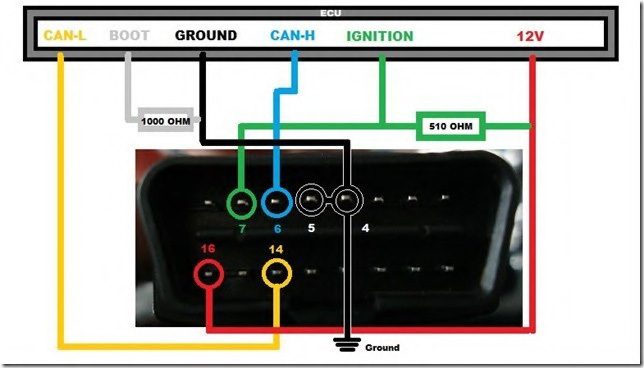
On the diagram below you can find how to connect the AVDI to the ECU to use the boot-mode. Please pay attention that connection 510Ohm resistance between the ECU Ignition and 12V is mandatory to get communication with the ECU boot-mode.
N.B! Please be informed the DB15 cable that is part of the Distribution Box set needs to be disconnected from the power supply during the wiring process of the unit if ZN151 is used.
Legend
-
Power - Yellow (B+)
-
IGN - Orange (IGN)
-
GND - Black (GND)
-
CAN HI - Red (CAN6)
-
CAN LOW - Blue (CAN14)
-
T1 - Brown (T1)
-
T2 - Green (T2)
-
Boot - White
N.B! ZN151 Distribution Box with version 2.2 or lower has a DB15 cable that uses different colors from ZN151 v2.3 or higher. The legend for ZN151 v2.2 or lower uses the following colors found in the legend below:
Legend
-
Power - Y ellow (B+)
-
IGN - Yellow/PINK (IGN)
-
GND - Black (GND)
-
CAN HI - Red (CAN6)
-
CAN LOW - Blue (CAN14)
-
T1 - Green/Brown (T1)
-
T2 - Green (T2)
-
Boot - White
ECU EDC17 CP44 TC1797
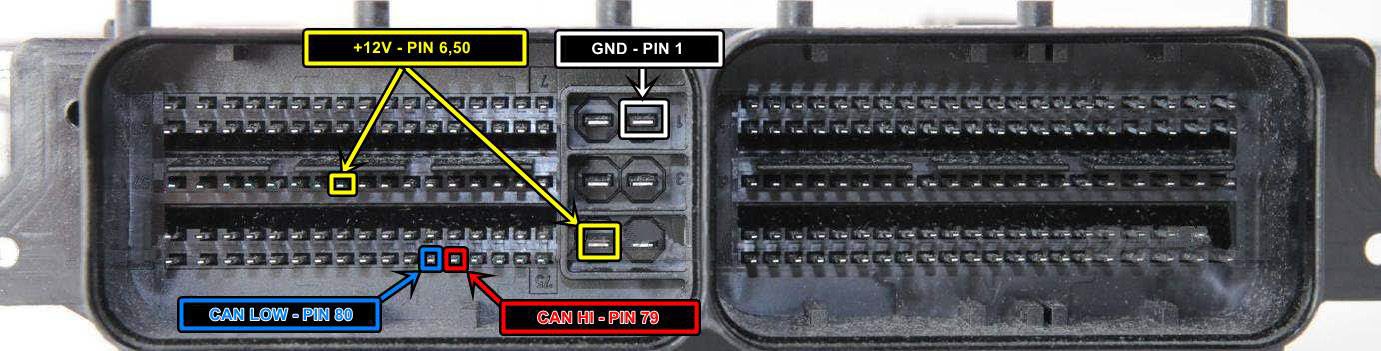
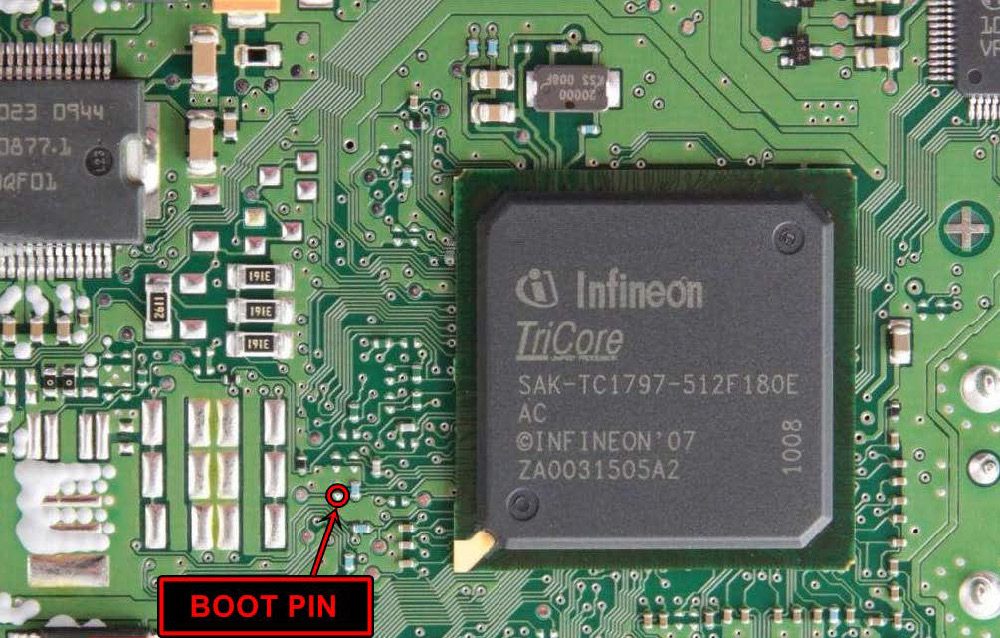
-
T1- PIN 18
-
T2- PIN 21
ECU Vag EDC17 C46 TC1767
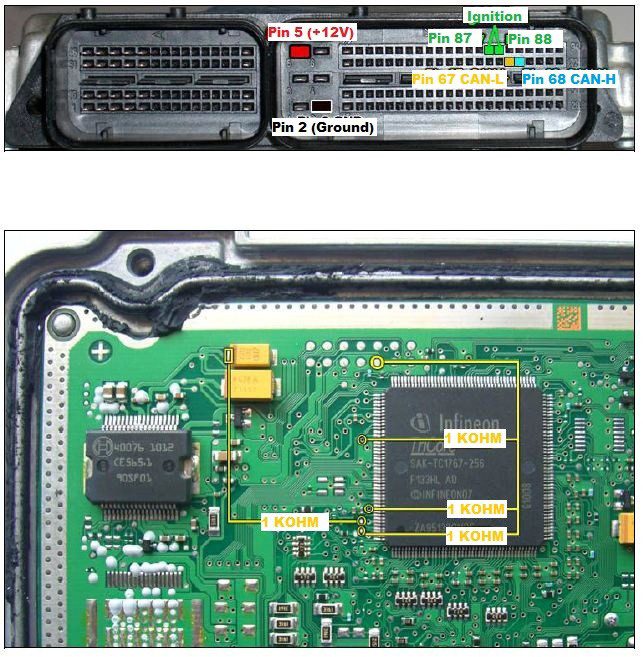
ECU Vag EDC17 CP04 – TC1796
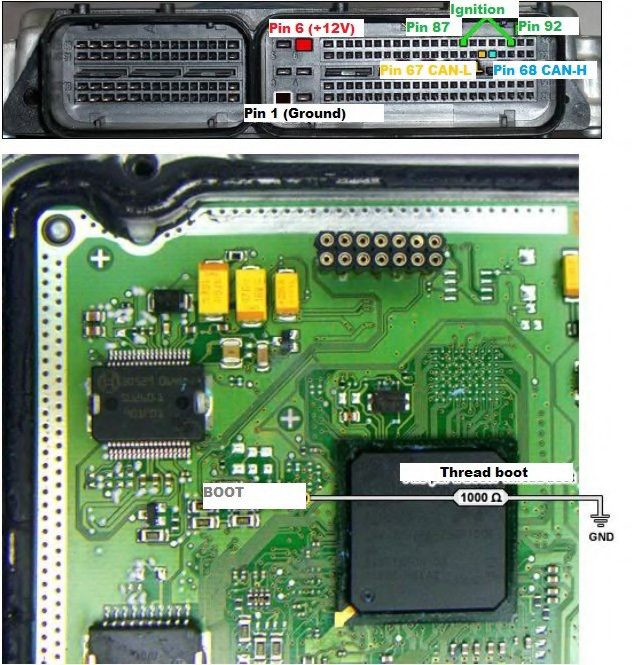
ECU Vag EDC17 CP14 CP20 – TC1796 – variant 2
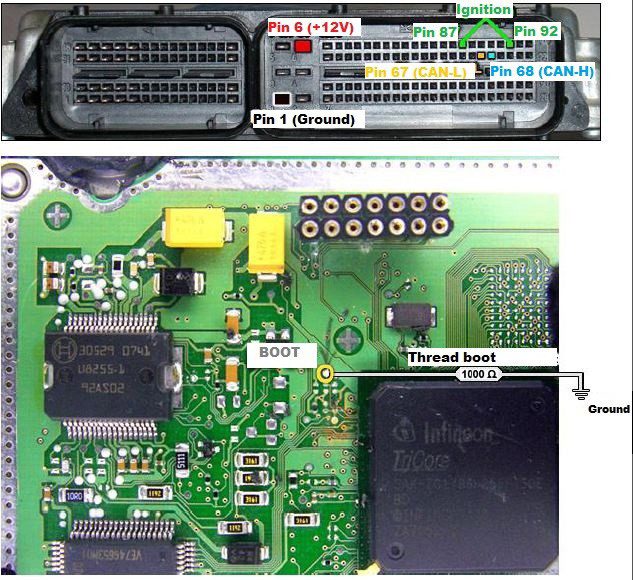
ECU Vag EDC17 CP14 CP20 - TC1796 with Internal and External Flash
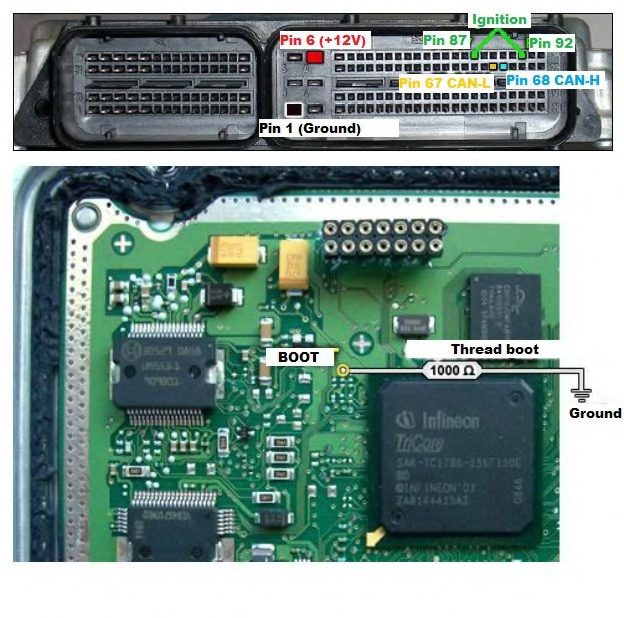
ECU Vag EDC17 CP24 – TC1796 with Internal and External Flash
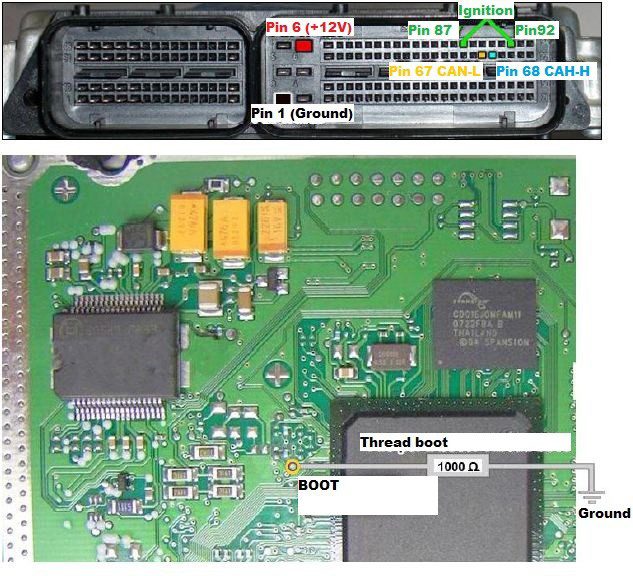
ECU Vag EDC17 U01 - TC1766 with Internal Flash
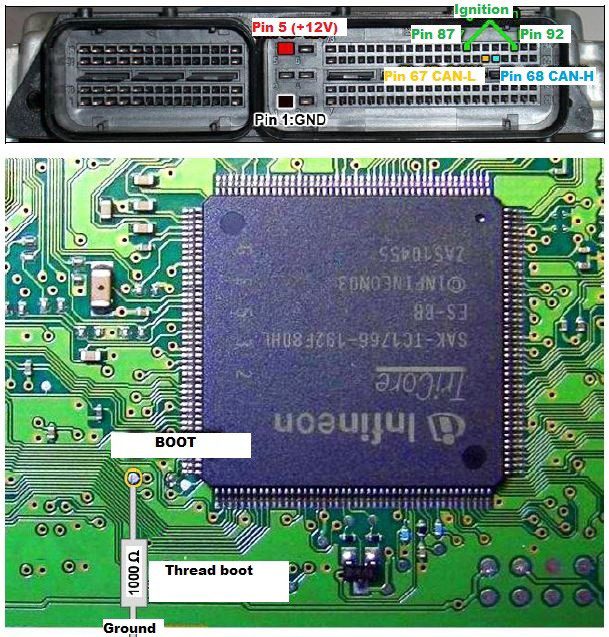
ECU Vag EDC17 U05 – TC1796 with External Flash
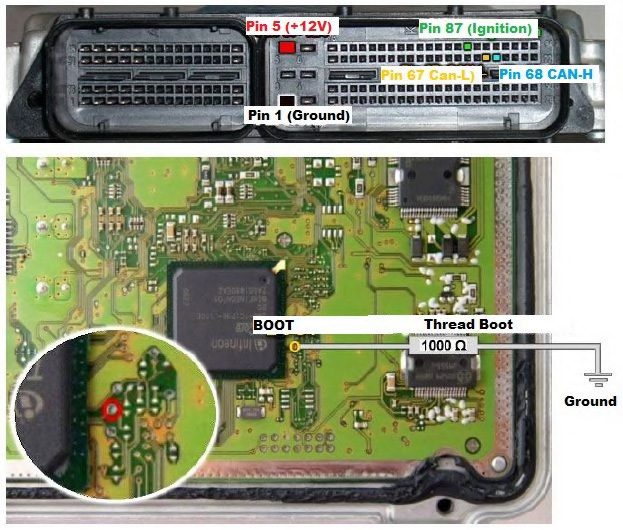
ECU Vag MED 17.5.1 – TC1796 with Internal and External Flash
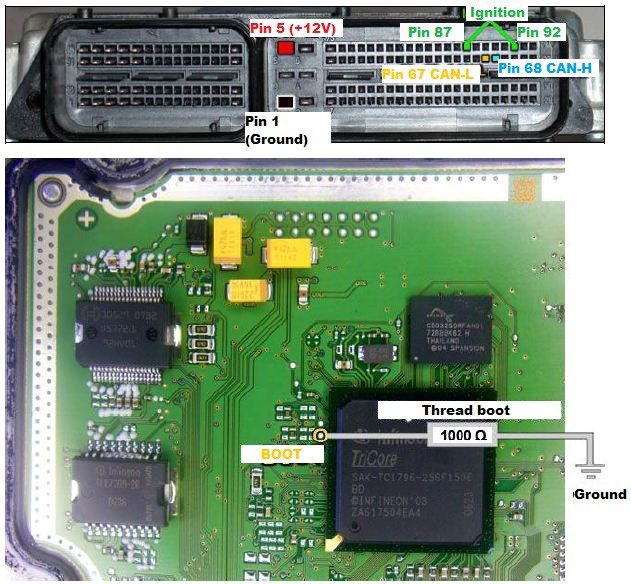
ECU Vag MED 17.5.2 – TC1767 Internal Flash
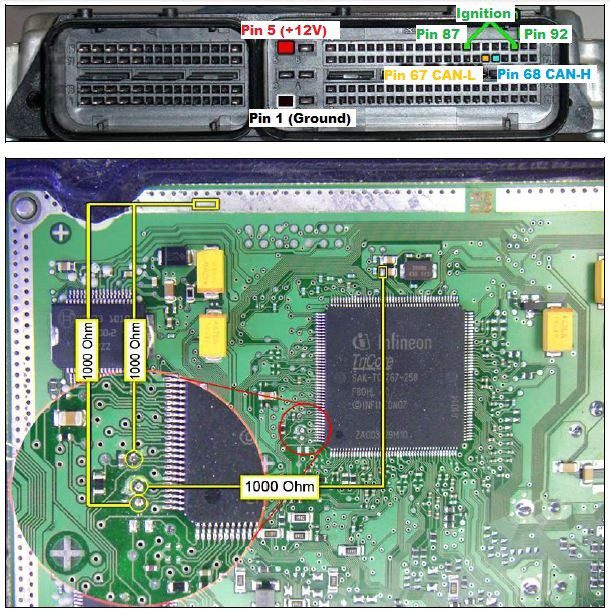
ECU Vag MED 17.5.5 - TC1766 Internal Flash
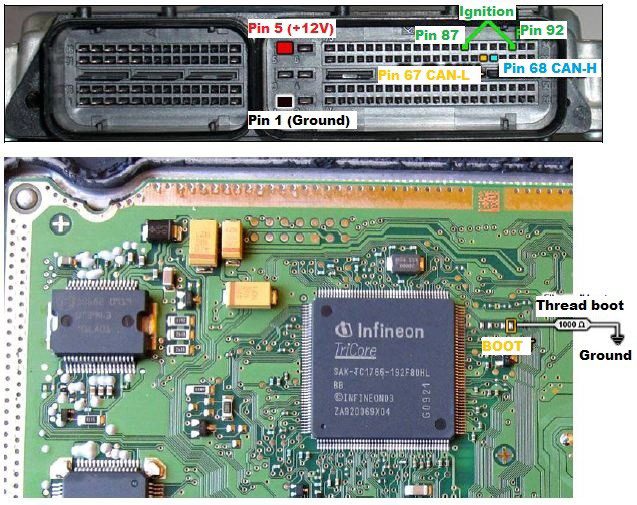
ECU Vag MED 17.5.20 - TC1766 Internal Flash
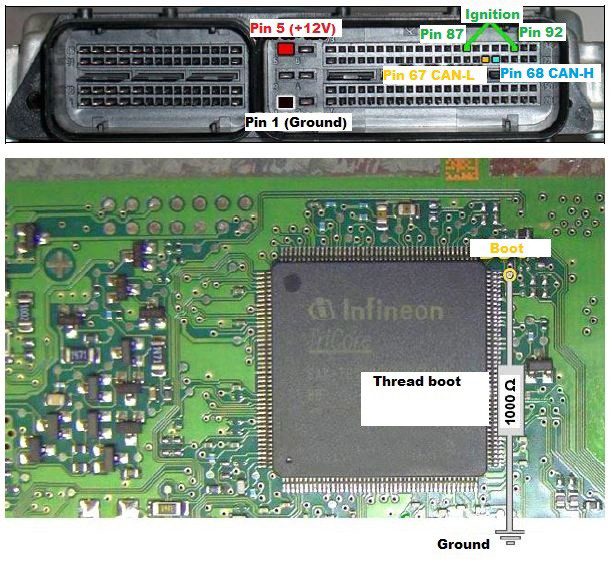
ECU Vag MED17.1.1 – TC1796 Internal Flash
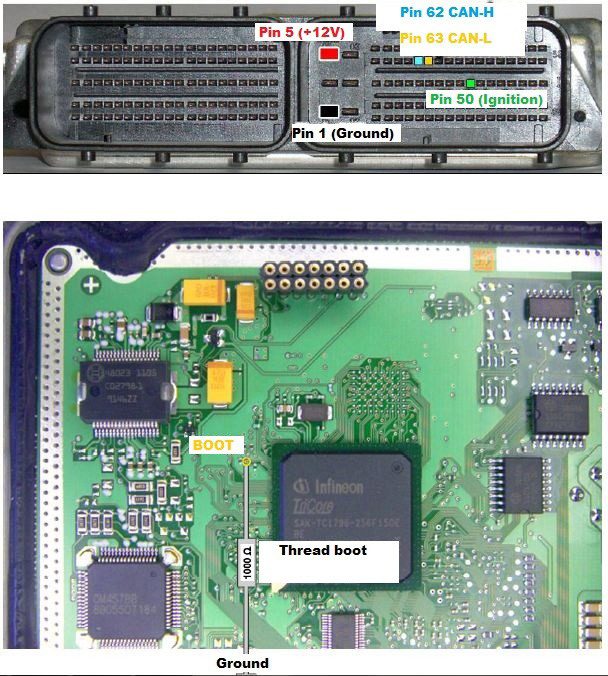
ECU Vag ME17.5.24 – Boot Mode
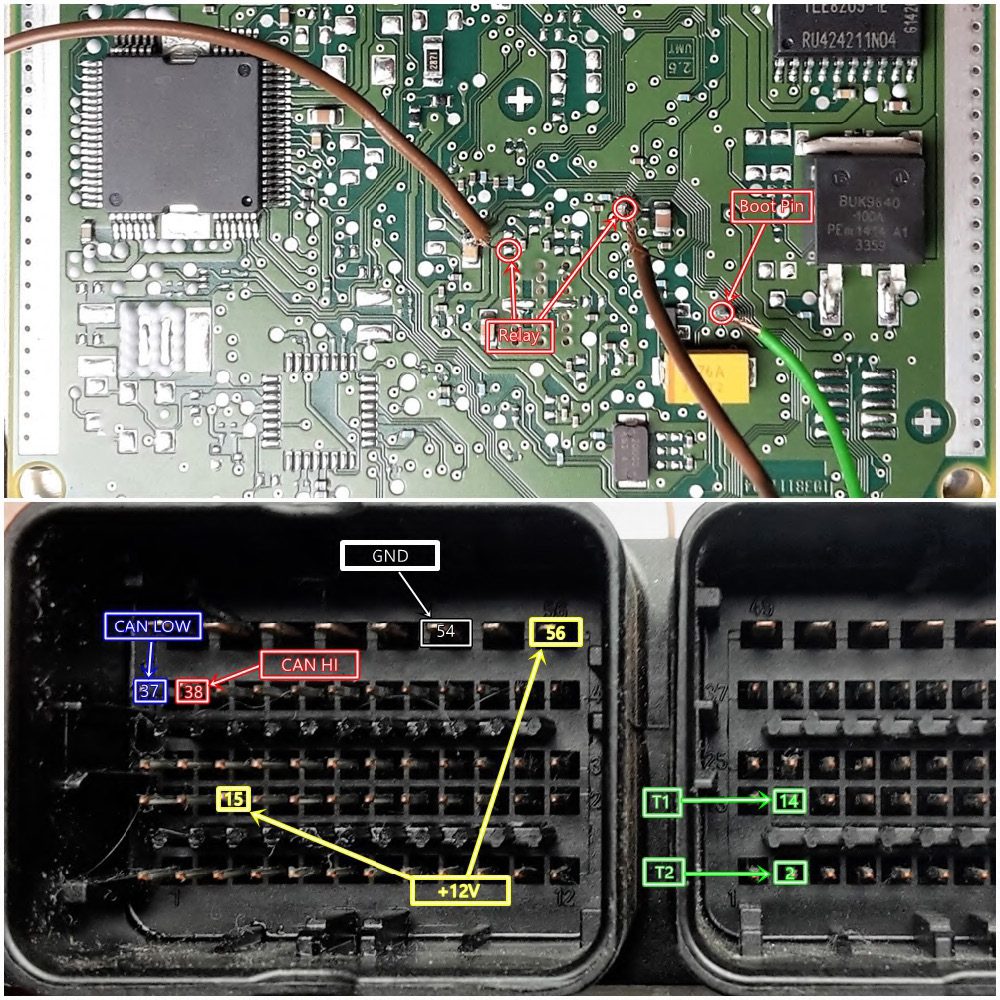
ECU Vag MED17.5.25 – Boot Mode
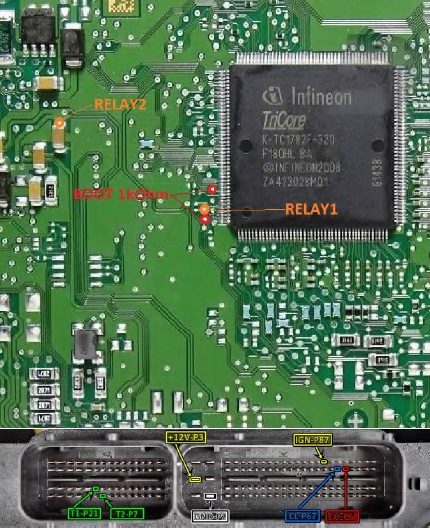
On Different EDC 17 ECUs, you can follow the following steps to connect to the ECU when using the ZN151 Distribution Box.
-
connect the boot pin of the engine control unit to the GND cable of the DB-15 cable
-
connect the CAN-H of the ECU to CAN H of the DB-15 Cable Connector (Red Connector)
-
connect the CAN-L of the ECU to CAN L of the DB-15 Cable Connector (Blue Connector)
-
connect the ignition of the ECU to the IGN Cable of the DB-15 Cable
-
connect the power supply (12V and Ground) of the ECU to the B+ and GND DB-15 Connector Cable
EDC17 C64 ECU PIN Connection diagram
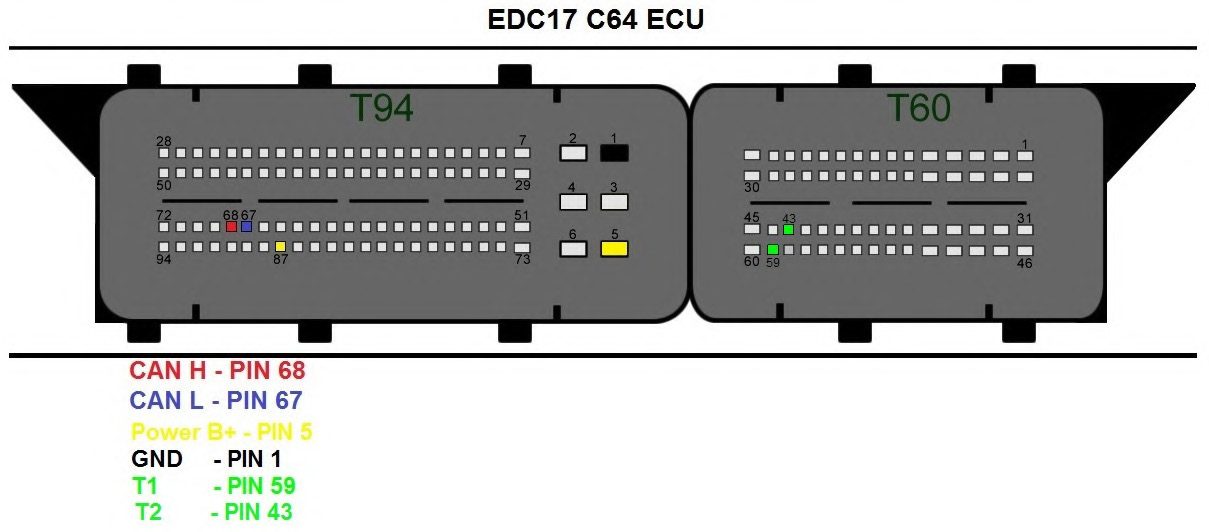
Note: The DB-15 Cable from the ZN151 Distribution Box kit can be used with all other VAG ECUs by following the connection diagrams.
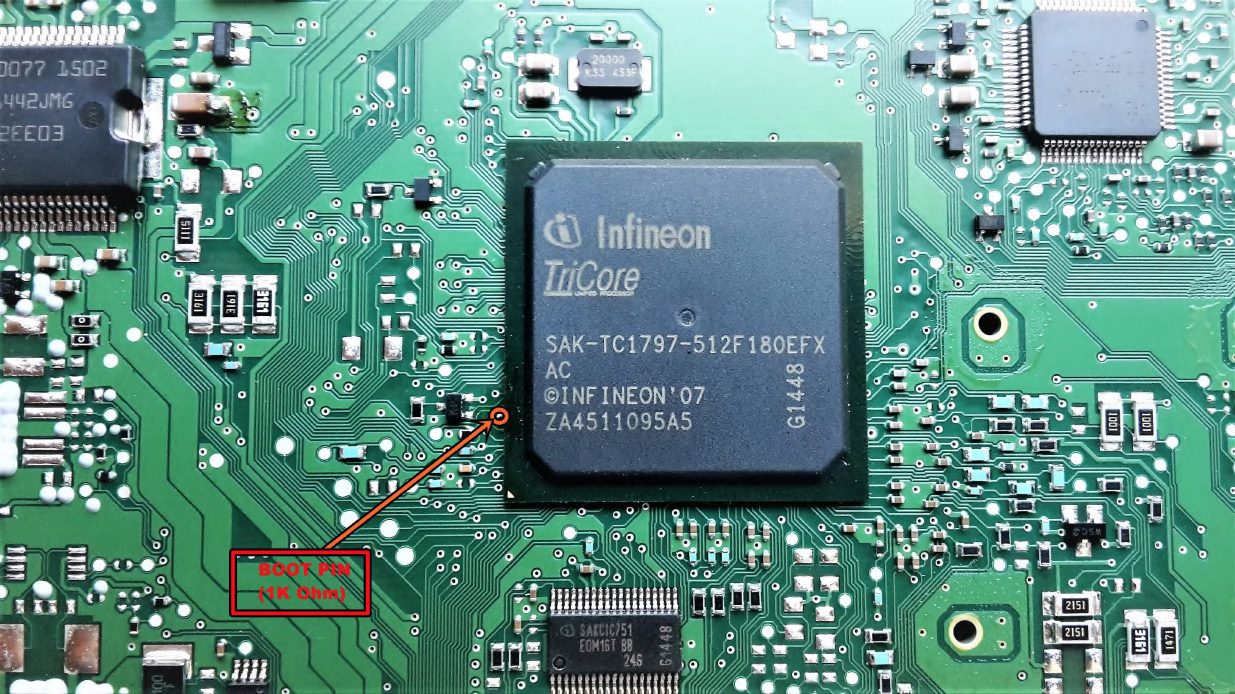
Simos PCR 2.1 Boot Mode and Relay connection diagram
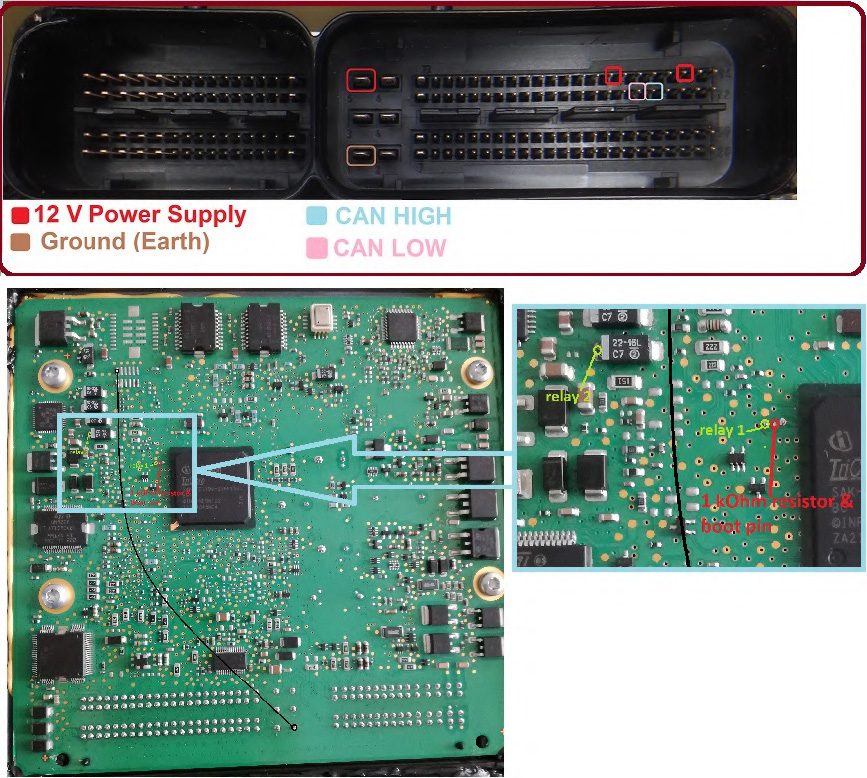
EDC17CP54 ECU Boot Mode Diagram
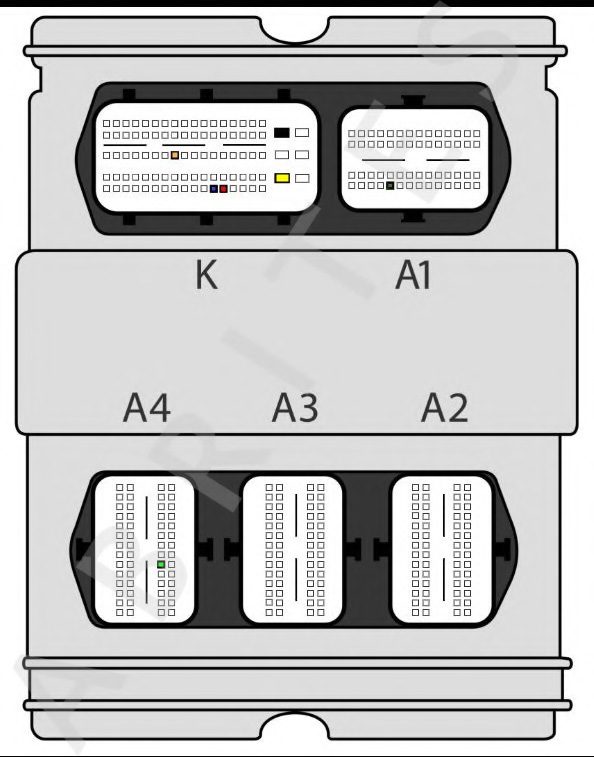
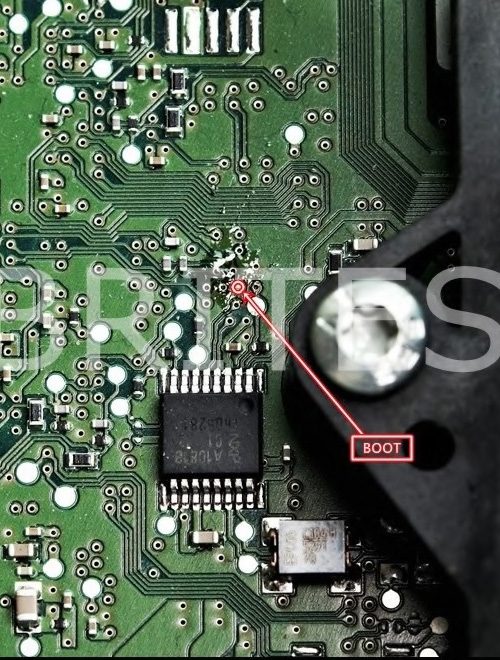
MED 17.1.6 ECU for Porsche connection diagram
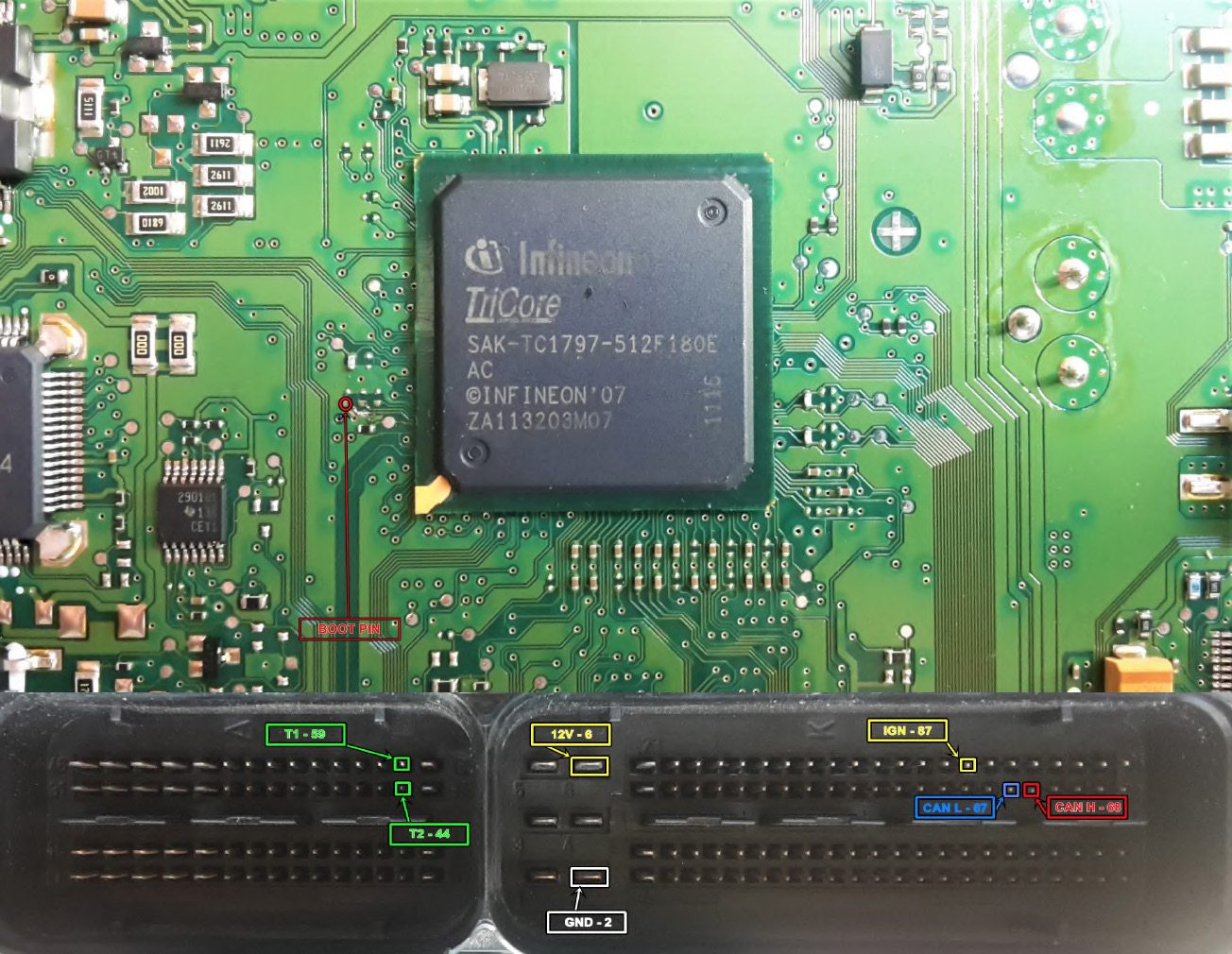
ECU MM_9GV Pinout Diagram
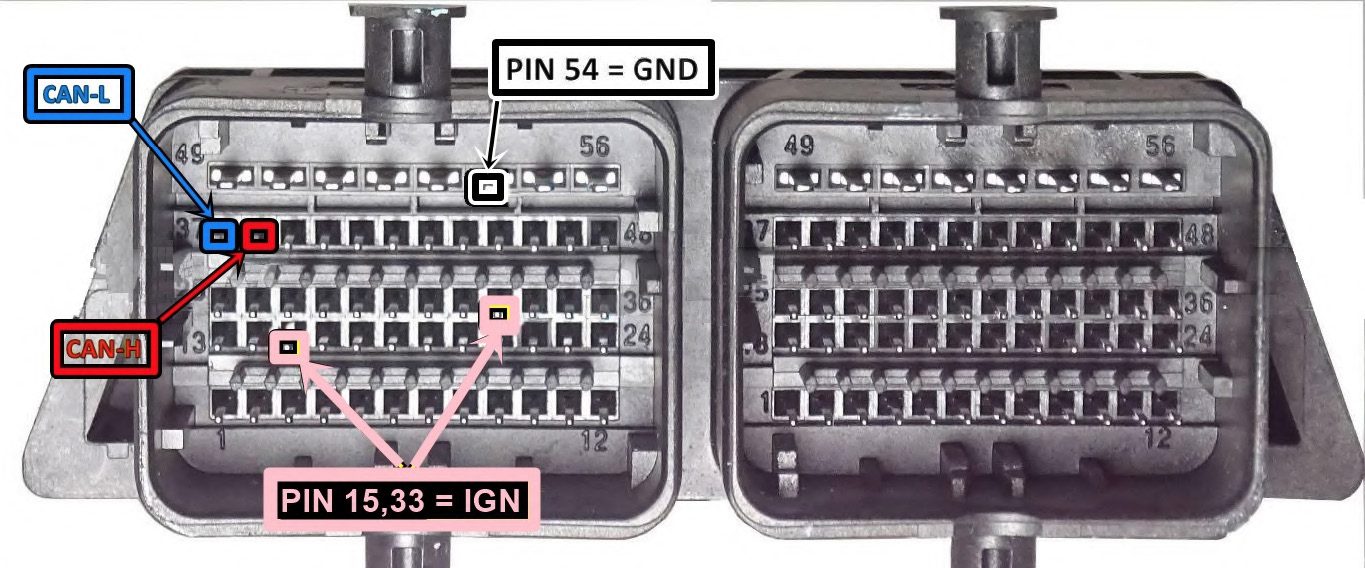
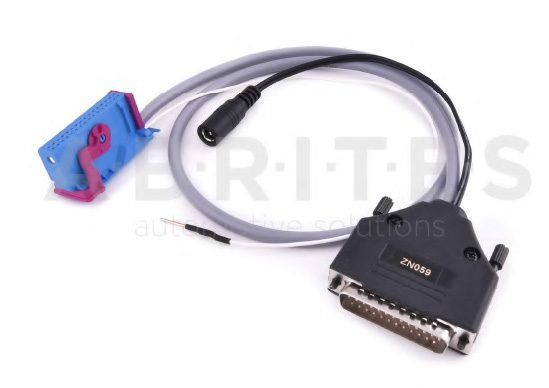
ZN059-VAG VDO Cluster Adapter
The ZN059 adapter is used to enter service mode for VAG VDO dashboards with the new style connector. ZN063-Power adapter 12V/1A DC IS REQUIRED. The ZN059 adapter is directly connected to the AVDI.