If the respective procedure requires pre-coding of the key/transponder before it is learned to the car, the button “Prepare dealer key” will be available. Preparing the dealer key require the 7bytes of the CS. The preparation of a dealer key is a little bit different for vehicles using the Megamos 48 transponder and the Hitag2 transponder.
a) Preparing dealer key on vehicles with Megamos 48 transponder
Pressing the button will show the following dialog
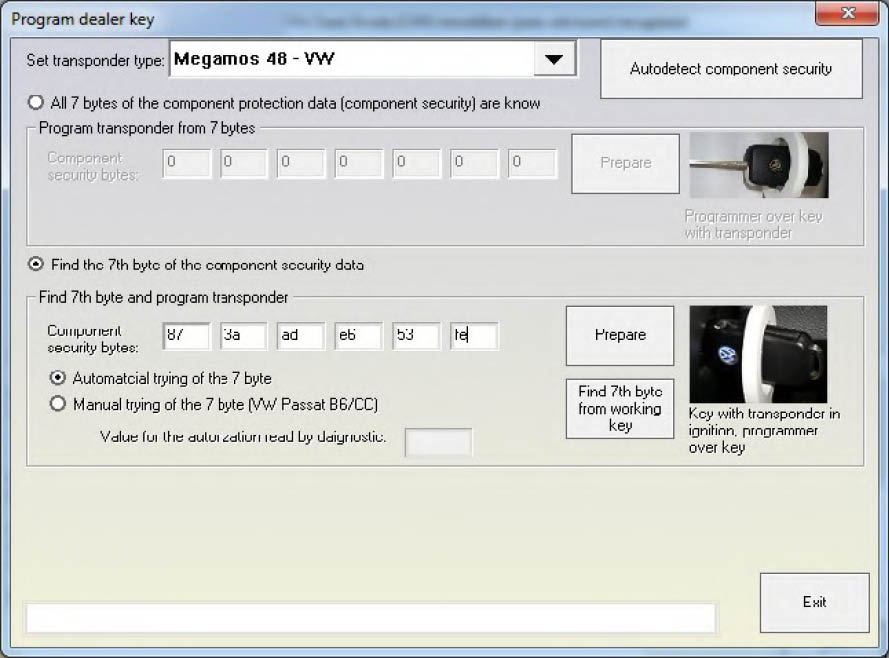
The 7 bytes of the component protection data are contained inside the immobilizer and sometimes inside the engine control unit. Inside the engine control unit there are always at least 6 of the component protection bytes stored, sometimes also the 7th byte is contained.
There are several ways to extract the component security
- Simply press the “Autodetect component security” (select “Autodetect component security” and press “Next” in case of “Wizard mode”) and the component security bytes will be read from the ECU.
This will also automatically decide whether you have the 7th byte, or you will need to search for it. Also the login will be displayed in the status bar. The autodetection is not always possible, it basically works for EDC16 and MED9x engines which are using a CAN diagnostic connection.
- The component security bytes are displayed e.g. using the special function “Engine Control Unit” - when reading the EEPROM of the engine control unit the ABRITES Diagnostics for VAG will show you the component security bytes:

- For CAN TP2.0 immobilizers in most of the cases it is possible to read all 7 bytes from the instrument/ immobilizer. This is possible from the Immo panel – you have to go to “Special function”, then “Instrument CAN” and “Read/write immo data”. After you read the immobilizer data in the field “Serial Key” the 7 bytes of the component security will appear.
b) Preparing a dealer key with all 7 bytes available
If the 7th byte is different from “00” then you have all the 7 bytes of the component security and you are able to prepare a transponder directly with the Key programmer. In this case you must choose “All 7 bytes of the component protection data (component security are known)”, put the 7 bytes and press the “Program” button.
c) Preparing a dealer key by finding the 7th byte
If the 7th byte is not available you must choose “Find the 7th byte of the component security data” and you have to put the six bytes which you already have. There are three possible ways to check whether the
7th byte is correct
-
From working key – if you have a key which can start the car, put it in the programmer and press “Find 7th byte from working key” - after 70-80 seconds the 7th byte should be found;
-
Automatically
This mode requires that the immobilizer and the Key can simultaneously read/write the transponder. For that reason you have to turn the ignition ON and place the programmer ring over the key (when the key is in the ignition).
NOTE: The automatic check might not be possible for some models (e.g. VW Passat B6). So it is required that the manual procedure is used in this case.
- Manual
The main difference between the automatic and manual procedure is that according to the anual procedure you should put the key into the programmer, then turn the ignition to ON with it, and then once again to the programmer and so on until the byte is found.
If you use the manual procedure you will be consecutively prompted to put the transponder into the program, and then to turn it to the ignition ON position.
Normally for most models it is required that the key is in the ignition, and you only change the position of the transponder. You will be prompted to put the transponder into the programmer, then to put it near the ignition lock so it is read by the immobilizer. An exception is the Passat B6. For it it is required that you put the key with the transponder into the programmer, then the key with the transponder into the ignition lock, UP TO THE FIRST POSITION ONLY, then again into the programmer, and again into the ignition lock until the byte is found.
NOTE: If you get an “XXX” message you need to stop at the current position and wait for 10 minutes before you continue.
ATTENTION: For the Passat B6 there are some cars for which you cannot search for the 7th byte. For such cars a key can be made only by opening the comfort module and reading the comfort module EE - PROM. Then after having the 6 bytes of the component security from the engine, you can extract the 7th byte from the comfort module’s EEPROM using the dump tool. It is also possible to program directly the key to the car from the dump tool if you have attached a programmer. For more details please refer to the dump tool section.
ATTENTION: As mentioned above for some cars it is not possible to find the 7th byte of the components security. You can understand if this is possible for the car you are working on by performing the following procedure: a) Connect with 25-Immobilizer and go to “Measured Vaues”, Channel 2 b) Put the original key or key with a Megamos 48 transponder – in this case in the Measured values you should have a “yes” or “1” on the second position of channel 2 c) Eject the key so there is no key in the ignition lock → If the second position is changes to “No” or “0” you CANNOT search for the 7th byte → If the second position remains at “Yes” or “1” you can search for the 7th byte After you obtain a dealer key/transponder you can proceed with normal key-learning. Simply put the number of keys to learn and the security access code and the keys will be learned.
Megamos 48 key less-go keys (e.g. VW Scirroco, Jetta, Golf 6, Tuguan, Touaran 2010+ and others) are also supported.
d) Preparing dealer key on vehicles with Hitag2 transponder
Pressing the button will show the following dialog
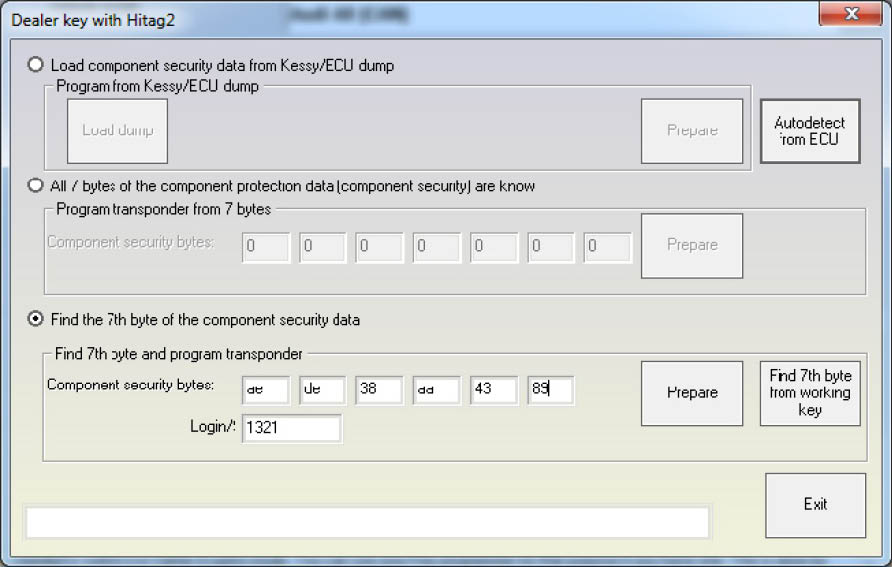
There are following possibilities for preparing the dealer key
- Making the key without disassembling the Kessy (completely by OBDII)
The “Autodetect from ECU” button will try automatically to read the component security bytes from the ECU, and will select for you automatically whether you need to search for the 7th byte or not.
IMPORTANT: If you do not have a working key from the car, you will need to short the fuses as described in the appendix to get communication with the ECU.
After the component security is read, if you have all 7 bytes, you can program the key directly. If you have only 6 of the bytes, you have to choose: a) if you have working key from the car, you can put it into the programmer, and press the “Find 7th byte from working key” button - the 7th byte will be found in several seconds; b) if you do not have a working key, you have to search for the 7th byte manually. The procedure takes approximately 20-25 min, but can last up to 45min. You have to connect the interface to the OBDII, and the programmer should be connected too. Then after pressing the “Program” button you will receive notification when to put the key into the ignition, and when to put it into the programmer.
IMPORTANT: You only need to put the key inside, please DO NOT ROTATE THE KEY.
IMPORTANT: You might hold the programmer near the ignition lock so you can proceed faster when you remove the key. But please pay attention that the programmer is at least 15cm from the ignition lock so the reading of the key from the car is not disturbed.
NOTE: It is always better to use a plastic key or an empty transponder when you search for the 7th byte, at least when you prepare such keys for the first time. If for some reason the key becomes locked (e.g. battery goes down, computer is hangup, etc.), you can find the encryption-key with the “Find 7th byte from working key” button, and then you can restore the key with the Tag key tool.
- Making a key by disassembling the Kessy or the ECU
You can load a dump of the Kessy or ECU using the “Load component protection from Kessy/ECU dump” radio-button. After pressing the “Load dump ”button you have to select the respective dump file, after that the “Program” button will be active.
NOTE: Please pay attention that in the ECU dump sometimes there are only 6 of the component security bytes. In this case you will need to search for the 7th byte as described above.
NOTE: Please pay attention that if you have the Kessy dump, you will have all the 7 bytes. But there are a lot of Kessy devices with different software versions, so it is possible that the EEPROM is incorrectly decrypted (especially for newer cars), respectively the component security bytes will be wrong. In this case the key will not work and you will need to restore the key using the Hitag2 programmer. The best way to check whether the Kessy dump is decrypted correct, is to get the PIN code from the dump tool and to try to put it in the immobilizer. If it accepted, than the decryption of the EEPROM dump is OK.
- Making a key if the CS is already known
If you have already read the component security bytes prior to that (e.g. by dissoldering the ECU EEPROM and decoding it by dump tool), then you can put the component security bytes manually and proceed as described above After the key is prepared as a dealer key, write how many keys you need to program, write the security access and press the “Learn” button.