In order to adapt the ECU or TCU you need to get the CS of the control unit from the donor vehicle and to have a working from the host vehicle.
- ECU adaptation - in order to extract the current CS of an ECU you need to read its Data Flash and Program Flash(external/internal) and load them in the Engine Control Unit special function > EDC17/ MEDC boot mode > Get PIN/CS from dump.
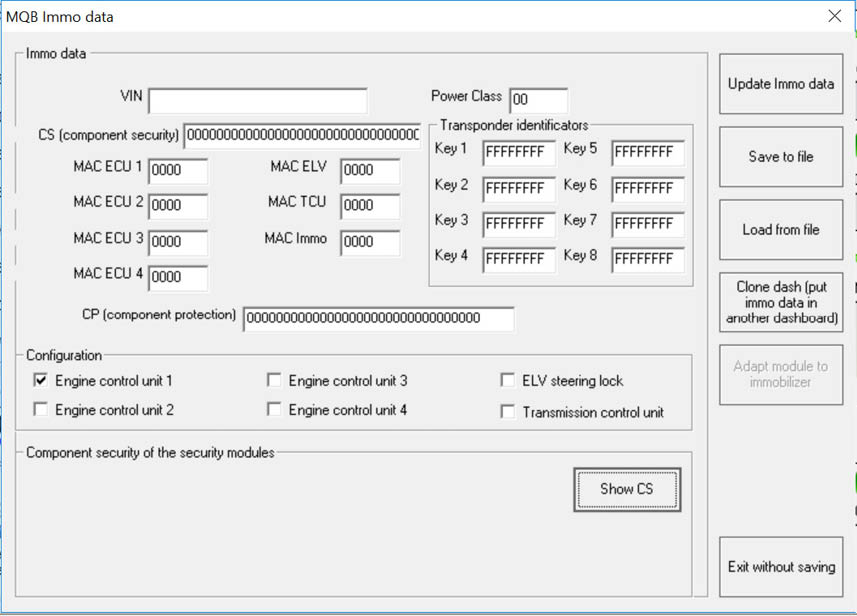
Once you get the current CS of the ECU you need to check what should be the new CS that has to be written to the ECU, this is done through CAN instrument special function > VDO based on MQB platform > Immo data . The new CS that you have to write to the ECU will be displayed when you go to the Configuration options > select ECU > select Show CS > Put a working key into your PROTAG programmer and the new CS will be displayed.
All you need to do then is to select “Adapt module to immobilizer” and insert the current (old) CS of the ECU and the new CS .
- TCU adaptation - the procedure is the same as for the ECU adaptation but the only difference is that you have to extract the current CS following the procedure described in chapter 2.5.28 from Immo V adaptation special function > Transmission control unit > MQB platform.