When you select the ICP type of “Instrument Cluster Audi A4 BOSCH RB8 CRYPTO 2004+” or “Instrument Cluster Audi A4 BOSCH RB4 CRYPTO 2001+”, a button “Repair RB8 DEF” (“Repair RB4 DEF” respectively) will appear. Pressing this button you will initiate the procedure of removing the “DEF” string from the dashboard display.
NOTE: It is recommended that you read and save the dashboards EERPOM and to make a note of the dashboard’s “Login” code before starting the procedure.
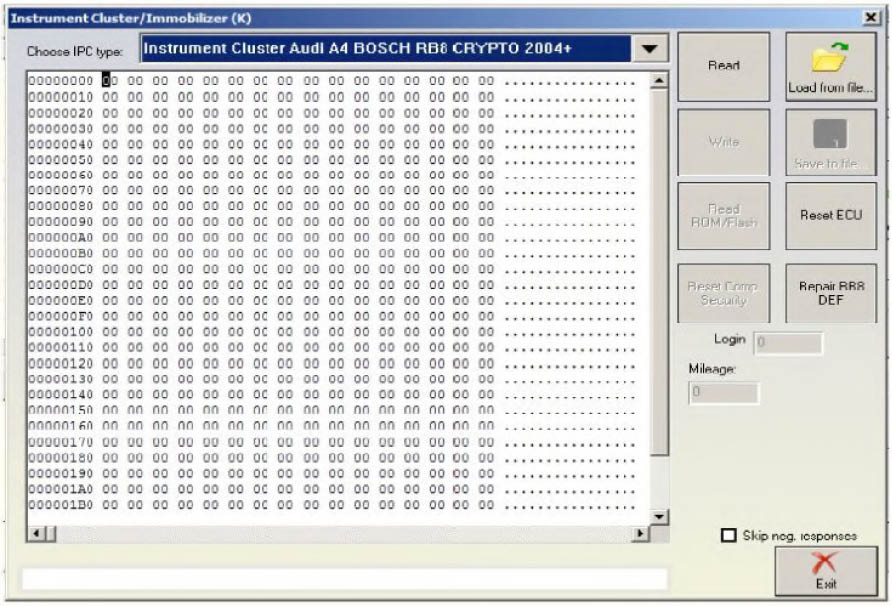
- Repair RB8 DEF:
During this procedure the software will read and write the EEPROM memory to the dashboard several times. It is normal for the dashboard to display a string saying “Error” during the time the procedure is in progress.
After writing the fixed EEPROM to the dashboard the software will try to automatically adapt the dashboard to the vehicle. (i.e. performing adaptation on channel 50). In order for this to be performed there will be a requirement for you to input a security access login. The login code needed is 13861. In most cases dashboards are not ready for the security access login right away and you will need to wait a little. The software will then ask you if it is to complete the procedure automatically or if you would like to do this yourself manually.
If you select the automatic manner once the waiting time is over the software will automatically adapt the new dashboard’s security code to channel 50 and will then ask you if you would like to transfer the old keys or if you would like to learn a new set using the “Key learning” special function. Depending on your choice the software will transfer the keys or not and complete the procedure.
If you choose to complete the procedure manually you will have to wait some time with the key in the “ON” position in the ignition, then connect to the instrument cluster through standard diagnostics, perform the security access (Login) with the 13861 login code and then adapt the dashboard’s access code on channel 50. After doing this you need to learn new keys using the “Key learning” special function.
- Repair RB4 DEF:
During this procedure the software will read, modify and write the EEPROM memory to the dashboard.
After the fixed EEPROM is written to the dashboard the software will try to automatically adapt the dashboard to the vehicle (i.e. to perform adaptation on channel 50). In order to do this, a security access (login) is needed with a login code 13861. In most cases the dashboard will not be ready for the security access right away so it might be needed to wait some time. The software will ask you whether you would like to wait and let it finish the procedure automatically or you would like to choose to cancel the procedure and finish it manually.
If you choose the automatic manner, when the waiting finishes the dashboard will allow you to login. The software will automatically adapt the dashboard’s security access code at channel 50. If you choose to finish the procedure manually you have to wait for some time with the Ignition in the ON position, then connect to the Instrument cluster through standard diagnostics, perform security access (Login) with ogin code 13861 and then perform adaptation of the dashboards security access code on channel 50. After the procedure finishes you have to learn all keys using the “Key learning” special function.