The “Engine Control Unit” special function provides the following options:
-
Read/Write of the flash memory.
-
Read/Write the flash counters.
-
Read/Write EEPROM.
-
Extracting security code/ PIN.
-
Immobilizer Enable/Disable (EDC15/EDC16/ME7x).
The functions are available after pressing the button “ECU” from the special functions tab of the main dialog:
Note: As of VAG version 28.0, all ECU Special Functions will be under one main ECU Button:
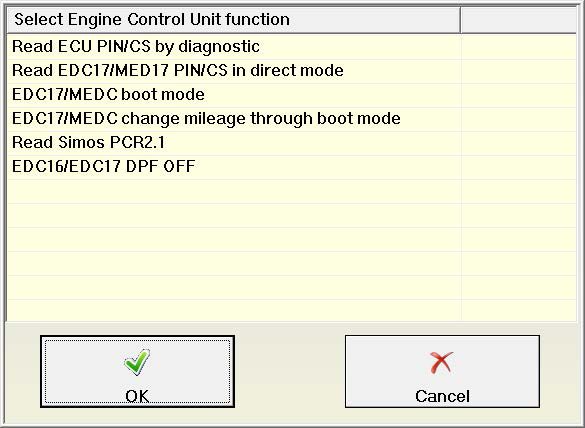
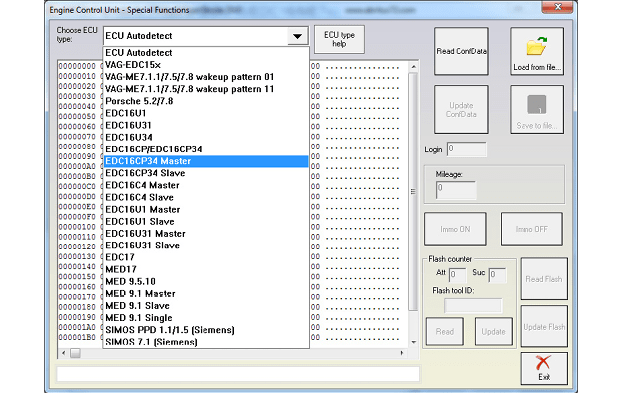
IMPORTANT: You need to specify the type of Engine Control Unit in the car before proceeding! There is also an “Auto detect function” implemented which will detect the ECU type in almost all cases, however it is possible that it is wrong and then you need to select the type manually.
You can choose the ECU type – VAG- EDC15x, VAG – ME7.1.1/7.5/7.8, Porsche 5.2/7.8 BOSCH VAG-ED - C15x, VAG-ME7.1.1, VAG-ME7.1, VAG-ME7.5, VAG-Cartronic ME7.8, EDC16U1, EDC16U3x/CP, etc. (Extracting security code, enable disable immobilizer etc.)
The example shows: 1.9 TDI – EDC16
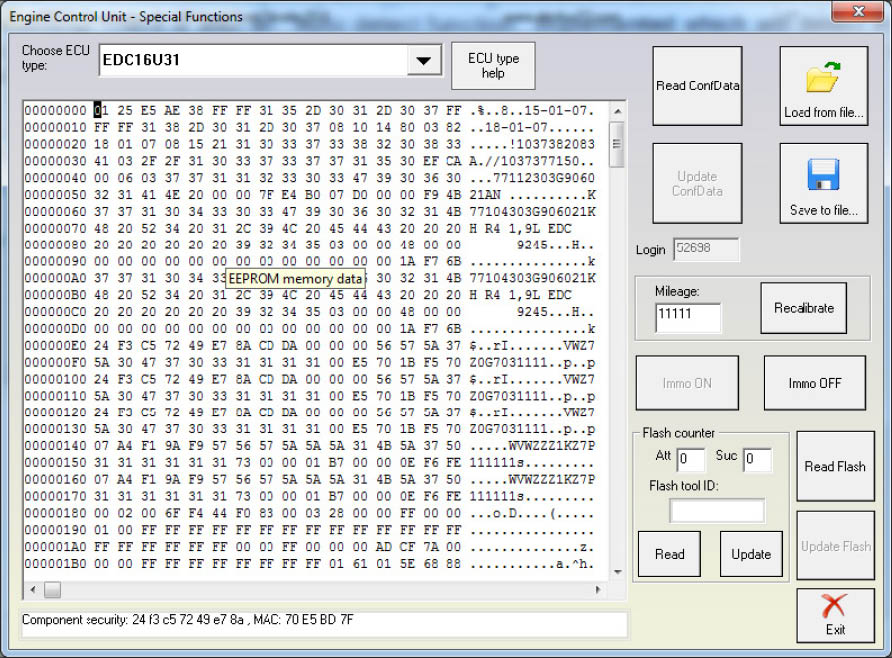
HINTS when reading/writing EEPROM memory of ECUs
-
The whole EEPROM could be read for EDC15/ME7/EDC16. For MED9, EDC17 and Simos engine control units only the PIN/CS/MAC is displayed.
-
To read the EDC17/MED17 PIN/CS/MAC is required to have internet connection!!!
-
If you experience problems with reading ME7.x EEPROM it is better to remove fuse 11 and fuse 15 to prevent disturbing of communication from the instrument cluster and try again.
HINTS when reading/writing flash memories of ECUs (or changing flash counters)
- In case of EDC15 the best advice is to remove fuse 11 and fuse 15 to prevent disturbing of communication from the instrument cluster.
At a certain point during reading/writing flash memory of the EDC15 ECU, you will see “Trying gateway options...” written on the status line at the bottom of the “Engine Control Unit” window. Turn the ignition OFF and ON at this point.
- In case of ME7.x or ECUs from Porsche you can read the flash memory as if you are reading the EEPROM – the only difference is that you need to uncheck the checkbox for automatic detection of EEPROM and put the corresponding start address and length.
If you experience problems with reading ME7.x memory it is better to remove fuse 11 and fuse 15 to prevent disturbing of communication from the instrument cluster and try again.
-
When flashing the device please always read and save first the original flash!
-
When using EDC16 please note that the flash which was read is saved automatically in the “Flash” subfolder and can be used in case of failure to restore the flash.
ATTENTION: FILE IS CRYPTED!!! Don’t use it directly to write flash! In case of failure during the flashing the device should enter into a boot-loader mode which will allow you to flash the device (but not to read it). The flash can be then restored with the “Custom Read/Write” function.
-
Please, stop all screen savers/power saving options and unused application during the flashing! Please do not do anything else on your PC while flashing.
-
Please, take into account that the reading/writing of the flash will take a long time (especially when CAN connection is used) – as result the battery July go flat.