Starting with a V5.2 of the ABRITES Diagnostics for VAG onwards it is possible to transfer the keys from one instrument to another. After reading the RB8 EEPROM there are two additional buttons:
“Read keys” and “Write keys”.
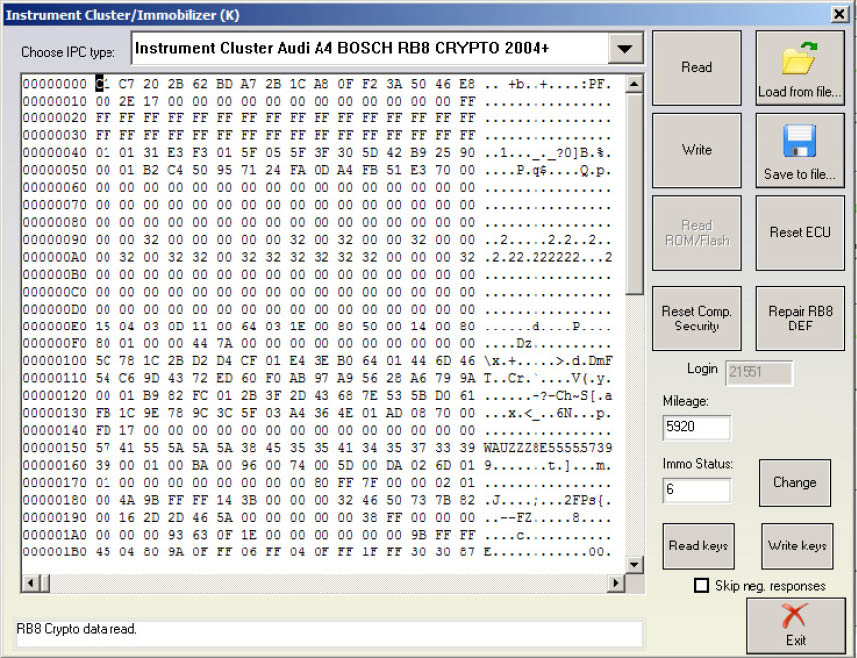
In order to transfer the keys you already have you have to first read the EEPROM of the source instrument and then by pressing the “Read keys” button you save them into a file.
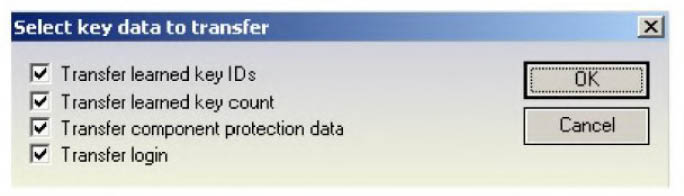
Once you do that you need to go to the destination instrument, read its EEPROM and then after pressing the “Write keys” button you will be prompted to show the location where the source keys were read and saved. After selecting the file you will be asked to specify what information you would like to transfer from the source instrument to the destination one.
-
“Transfer learned key IDs” - these are the fixed code identifiers. If you do not transfer them you will need to perform key learning on the new dashboard.
-
“Transfer learned key count” - transfer the amount of keys learned.
-
“Transfer component protection data” - this transfers the key variable code. Without this the keys are not recognized and cannot be learned. Please note that in order to start the engine you need to adjust the component protection data in the ECU too.
-
“Transfer login” - transfers the car’s login.
NOTE: There are two types of RB8 instrument clusters – those that have a 7 bytes component protection and those that have a 12 bytes one. The procedure above is valid for the 12 byte component protection versions. Almost all RB8 Instrument clusters have a 12 byte component protection. Those that have a 7 byte component protection are mainly found in A4 gasoline models; however the RS4 is also a 12 byte component protection car.