When you open this function the following window appears:
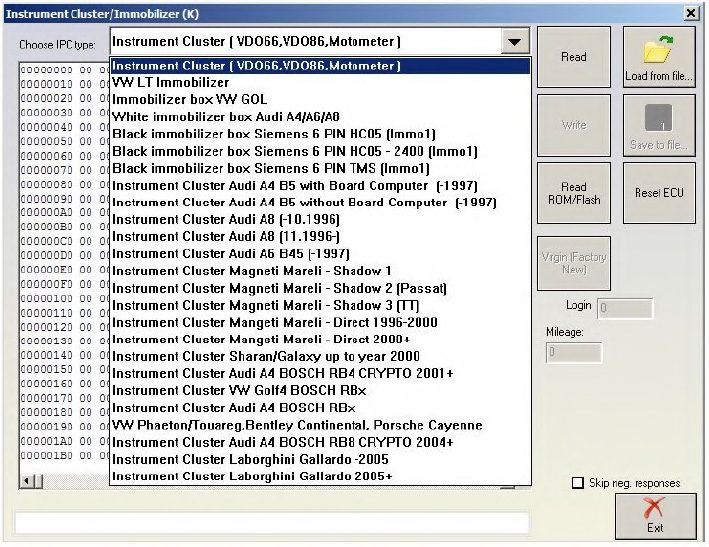
From this dialog box you will need to choose your instrument cluster type or the immobilizer and then you could read/ write the EEPROM ( read mileage, PIN etc.) Please be informed that the special function will only establish a connection via K-line ( KWP1281 or KWP2000) and this does not depend on the configuration options.
ATTENTION: All read EEPROM dumps will be stored in the “Dumps” sub folder of the Abrites Diagnostics for VAG so you could restore the EEPROM in case of any unwanted changes. Automatic parsing of data from the EEPROM (mileage and immobilizer) is implemented for most instrument clusters.
For instrument clusters from Magneti Marelli please refer to Appendix A.
If a connection to the Motometer instrument is not successful please send the text file “motometers.txt” to the following e-mail address: support@abrites.com and the instrument will be added to the database within a three business day period.
NOTE: Sometimes if you try accessing the instrument cluster by selecting the wrong type of cluster from the dialog, the cluster might block or reject future diagnostic requests until it is reset by disconnecting the power supply either from the battery or the fuse. For example this is a common issue which appears always with the Bosch clusters being blocked when being accessed as “Instrument cluster (VDO66, VDO86, Motometer)”
NOTE: Please be very careful when selecting “Instrument Cluster Audi A4 BOSCH RB4 CRYPTO 2001+” and “Instrument Cluster Audi A4 BOSCH RBx” instruments. You will be able to read the EEPROM of the instrument no matter which of both types is selected, but if you’ve chosen the wrong type and you try to make some changes, you can damage it. You can recognize whether the right type is selected by doing the following:
1.Choose “Instrument Cluster Audi A4 BOSCH RBx”
2.Read the EEPROM
3.If the displayed mileage corresponds to the real value, and if the displayed login is accepted, then the type is “Instrument Cluster Audi A4 BOSCH RBx”, otherwise it is “Instrument Cluster Audi A4 BOSCH RB4 CRYPTO 2001+”
NOTE: When reading the RB8 EEPROM the device is put into service mode and “L0 x-y” is displayed. If by any reason the instrument leaves in this situation (e.g. if your laptop goes off due flat battery, or you disconnect the interface from the car, or the car battery is flat), you need to read the RB8 instrument EEPROM, and change the immobilizer status to 6.