The software used to require an internal CAN connection using CB012. For the majority of models this is no longer required, and in only some rare cases will the software ask for it.
Required equipment
- Abrites AVDI interface
- CB012 for an internal CAN connection - no longer needed on most models, but it still helps in all keys lost, when the Smart System Module has to be read
Models that require the CB012 connection
Models covered by the TN014, TN015 and TN016 licences require the CB012 connection:
Toyota
- Yaris 2020+ (XP210) BA HT-AES
- Yaris Cross 2021+ (XP210) BA HT-AES
- Corolla Facelift 2022+ (E210) BA HT-AES
- Corolla Cross Facelift 2022+ (XG10) BA HT-AES
- Sienna 2020+ (XL40) BA DST-AES
- Harrier/Venza 2020+ (XU80) BA DST-AES
- Tundra 2021+ (XK70) BA DST-AES
- Land Cruiser 2021+ (J300) BA DST-AES
- RAV4 Facelift 2022+ (XA50) BA DST-AES
- Aygo X 2022+
- Yaris GR 2021+
- Prius WX60 2022+
- BZ4X 2022+
Lexus
- Lexus RX 2022+ B9 DST-AES key
- Lexus NX 2021+ B9 DST-AES key
- Lexus LX 2021+
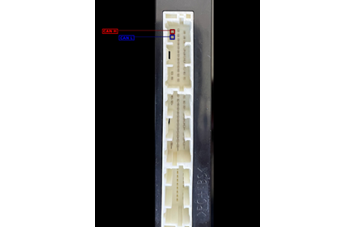
Smart System pinout for internal CAN
All of the Toyota/Lexus models covered by the TN011, TN012 and TN013 licences share the same Smart System pinout when connecting to the internal CAN bus:
| Pin | Signal |
|---|---|
| 1 | CAN H |
| 2 | CAN L |
These are the pins to connect to when working with the CB012.
Using the CB031 extension cable
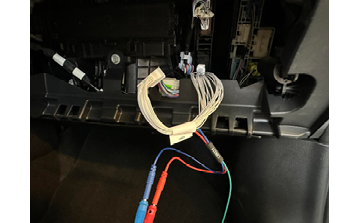
CB031 is an extension cable for directly connecting to the Toyota/Lexus Smart System with a B9/BA key. It makes the connection to the smart system much easier, without needing to find the CAN wires and puncture them. It is particularly useful in an All Keys Lost situation, where the Smart System Module has to be read.
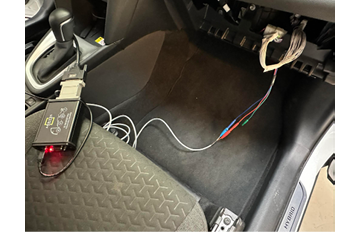
To use the CB031:
- Disconnect the smart system connector.
- Connect the CB031 to the smart system and to the wire (connector) coming from the vehicle — it works as a bypass.
- Connect the dedicated slots to the CB012 CAN connectors (red and blue).
Important notes
- Start over OBDII. Only add the internal CAN connection when the software asks for it, or when the vehicle is on the list above.
- The CB031 is the safer option where it fits — puncturing CAN wires risks damaging the harness.
- Take care to observe the CAN H / CAN L orientation; reversed connections simply will not communicate.
Troubleshooting
| Issue | Likely cause | Solution |
|---|---|---|
| Software asks for internal CAN | Model needs the CB012 connection | Connect CB012 (via CB031 where possible) and repeat |
| No communication over internal CAN | CAN H and CAN L swapped | Pin 1 is CAN H, pin 2 is CAN L on the TN011/TN012/TN013 models |
| Cannot reach the CAN wires safely | Working without CB031 | Use the CB031 bypass rather than puncturing wires |
| All Keys Lost, cannot read Smart System | Connection made to the harness only | The CB031 must bypass between the smart system and the vehicle connector |