Vehicle coverage: Toyota, Lexus and Scion vehicles supported by the Key Learning function of the Abrites Diagnostics for Toyota/Lexus/Scion Online software.
Supported operation:
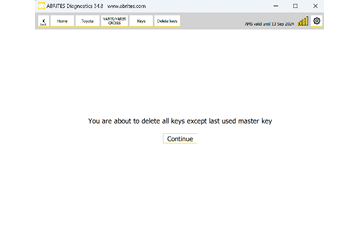
Deleting lost keys from the memory of the vehicle. After the procedure the vehicle is left with only the working key learned, and every other key previously known to it is erased.
Required equipment
- Abrites AVDI interface
- Abrites OBDII cable (SAE J1962) – CB106
- Windows PC with the latest Abrites Diagnostics for Toyota/Lexus/Scion Online software
- A working key for the vehicle – mandatory
- A stable power supply connected to the vehicle
Step‑by‑step procedure
1. Open the special function
Open the "Key Learning" special function.
2. Select the menu
Select the "Delete Keys" menu.
3. Follow the software
Follow the on-screen instructions through to completion.
Important notes
- Make sure you have a working key for the vehicle so the procedure can complete successfully. The car will be left with the working key learned, and the rest of the keys deleted.
- This is the correct procedure when a key has been lost and you need to make sure it can no longer start the vehicle.
- Deleting keys does not add keys. To add one afterwards, use Key Learning.
Troubleshooting
| Issue | Likely cause | Solution |
|---|---|---|
| Procedure will not start | No working key present | Obtain or program a working key first, then repeat |
| Vehicle will not start after deletion | The key used is no longer learned | Re-run Key Learning for the key you intend to keep |
| "Delete Keys" not shown | Wrong menu, or licence missing | Open the function from within "Key Learning"; check that your licence covers it |