Reading SPI EEPROM without the ZN031 adapter
You can use your “ZN130-ABPROG” for programming and reading of ordinary SPI EEPROM memory as M95080, M95160, M95320, M95640, M95128, M95256 without using “ZN031- M35XXX/SPI/I2C Adapter”. To do this you must connect the memory to DB25 connector in the manner shown in the picture.
Keep in mind that the power from “ZN130-ABPROG” is 5V DC!
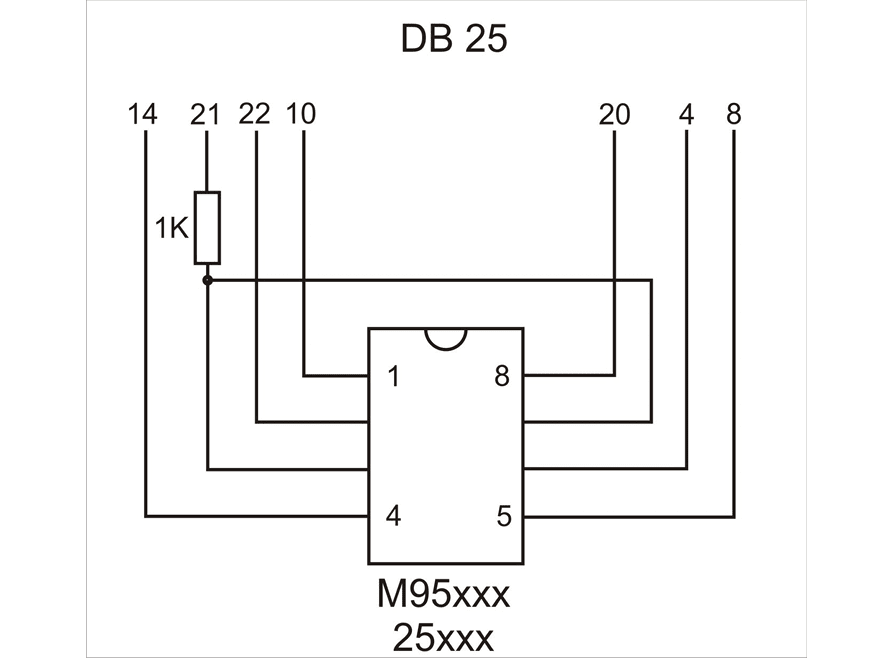
The full description of this connection is on the Connect “ZN130-ABPROG” without “ZN031-M35XXX/SPI/I2C adapter” page.
Keep in mind that the power from “ZN130-ABPROG” is 5V DC!
Required equipment
- Abrites AVDI interface
- ZN130 ABPROG programmer
- The DB25 Male connector from the ZN130 set
- Soldering equipment and wire
Step-by-step procedure
1. Wire the memory to the DB25 connector
Connect the SPI EEPROM to the DB25 connector in the manner shown in the picture on the Erasing Incremental EEPROM page.
2. Connect the programmer
Plug the DB25 into the ZN130, and the ZN130 into the AVDI.
3. Select the device and work
Select “EEPROM” and the memory type in the ABProg software, then read or program as usual.
Important notes
- This route covers ordinary SPI EEPROM only - M95080, M95160, M95320, M95640, M95128, M95256. The M35XXX incremental memories still need their own handling; see Erasing Incremental EEPROM.
- 5V DC is what the ABPROG supplies. Do not power the memory from a second source at the same time.
- For the wider set of home-made adapter pinouts, see DB25 Male Connector.