Once the connections are done, the procedure is simple and fast.
Required equipment
- Abrites AVDI interface
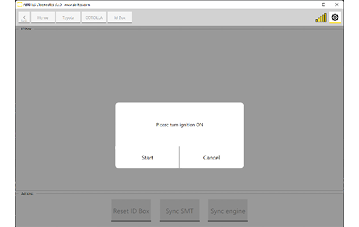
- A working key - ignition has to be ON at the ID Code Box step
- An external power supply - the procedure runs about 40 minutes
Step‑by‑step procedure
1. Open the software
Start the Toyota Online software with the AVDI connected over the CB106 cable.
2. Select the special function
Choose the "ID Code Box" special function. At this point you need ignition ON with a working key.
3. Synchronise the Smart System
Press "Sync SMT".
4. Confirm the result
When the routine completes, the Smart System and ID Code Box are synchronized.
What still remains
The ECU is not yet synchronized. ID-Code-Box adaptation with the Engine Control Unit over OBDII is required whenever the ID Code Box or the Engine Control Unit (ECU/HV) has been exchanged. A vehicle whose ECU synchronisation is missing stores DTC B279986, which itself points to the need for the ECU Sync procedure.
Continue with ECU Synchronization → Requirements.
Troubleshooting
| Issue | Likely cause | Solution |
|---|---|---|
| "Sync SMT" is unavailable | Ignition not ON, or no working key present | Switch ignition ON using a working key, then re-open the ID Code Box function |
| Synchronisation fails | ID Code Box is not new/virgin, or was not reset | Run the ID Code Box Reset procedure first |
| Vehicle still will not start afterwards | ECU synchronisation has not been done yet | Run ECU Synchronization — a separate procedure of about 40 minutes |
| B279986 stored | ECU and ID Code Box are not paired | Run the ECU Sync procedure |