Smart Access System Special function is dedicated to vehicles equipped with a smart key and a Smart Access System.
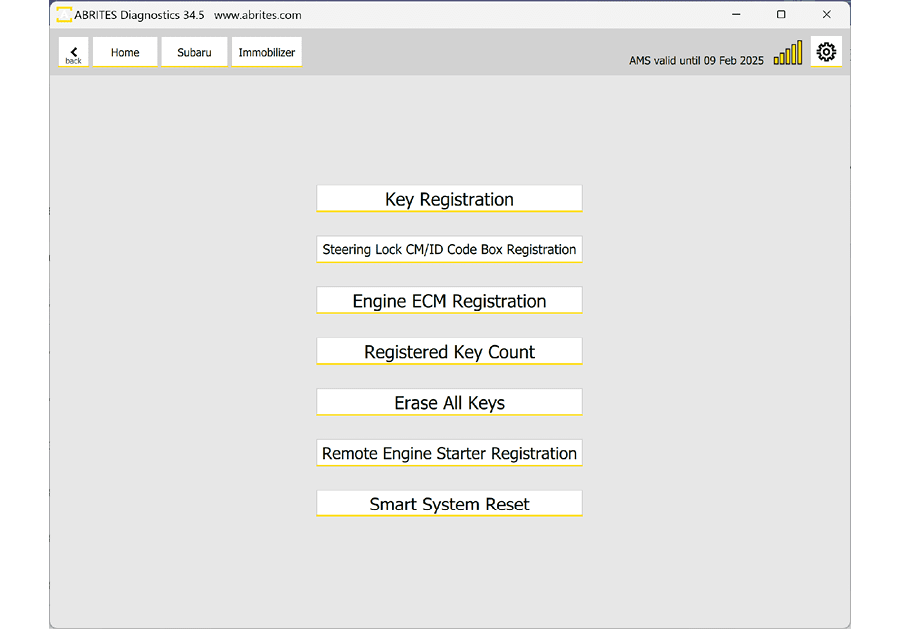
The available functionalities
| Function | What it does | Page |
|---|---|---|
| Read the number of access keys | How many keys are registered - maximum 8 | 6.1 Registered Key Count |
| Erase All Keys | Removes every key except the one presented | 6.2 Erase All Keys |
| Program additional key | Adds a key to the existing count | 6.3 Add keys - Key Registration |
| Perform All Keys Lost / Smart System reset | Prepares the vehicle for key learning with no working key | 6.4 All Keys Lost - Smart System Reset |
| Register ECM | Required after key programming | 6.5 Engine ECM registration |
| ESL adaptation | When the steering lock blocks an AKL job | 6.6 ESL Adaptation |
Required equipment
| Licence | SB004 — Alarm OFF and Key Learning for Subaru Vehicles (MY 2021-2026) |
- Abrites AVDI interface - executed via the OBDII port of the vehicle
- Abrites Diagnostics for Subaru software
Important notes
- The procedures are guided with all necessary steps described with on-screen messages, and are executed via OBDII port of the vehicle.
- Keys on this platform are held over the start button rather than turned in an ignition, and the prompts are timed.
- The mechanical-key equivalent of this menu is the Immobilizer Special Function.